Use cases · Cluster hub
AI Memory Use Cases: What Actually Differs
Customer support, coding agents and personal assistants all need memory, but they need it for different reasons, weighted toward different memory types, and each independently arrived at the same discipline: filter what never gets written before it ever reaches storage. This hub compares the three directly rather than listing them separately.
Three use cases
The comparison
Why does the same memory architecture serve such different use cases?
Because what’s at stake if memory gets it wrong is different in each case, and that changes which memory type carries the most weight. A support agent’s mistake is a commercial error; a coding agent’s mistake is a repeated bug; a personal assistant’s mistake is a trust failure. Same underlying write, retrieve and forget loop, three very different priorities layered on top of it.
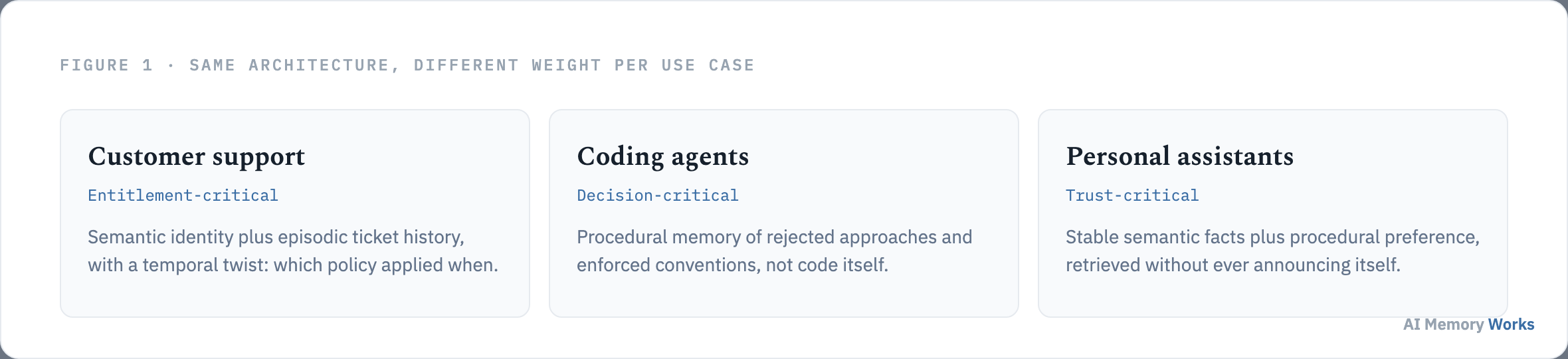
Customer support is entitlement-critical: getting a customer’s plan tier or contracted SLA wrong isn’t an embarrassing slip, it’s offering something the company didn’t agree to or refusing something it did. Coding agents are decision-critical: the value isn’t in remembering code, which is already indexed elsewhere, but in remembering which approach was already tried and rejected, so the same dead end doesn’t get walked twice. Personal assistants are trust-critical in a way neither of the others is: memory used badly here doesn’t just produce a wrong answer, it makes the whole system feel like surveillance, which is a failure mode specific to this use case alone.
That difference in stakes is what actually decides what’s worth remembering in each case, not a generic “store more” instinct. What does each use case actually need to remember?
The short list
What does each use case actually need to remember?
A short, specific list in every case, not an open-ended pile. Each of the 3 sub-pages on this hub, drawing on its own independent research into that use case, answers this question narrowly, and the narrowness is the point: everything outside the short list is noise competing with the useful facts for retrieval.
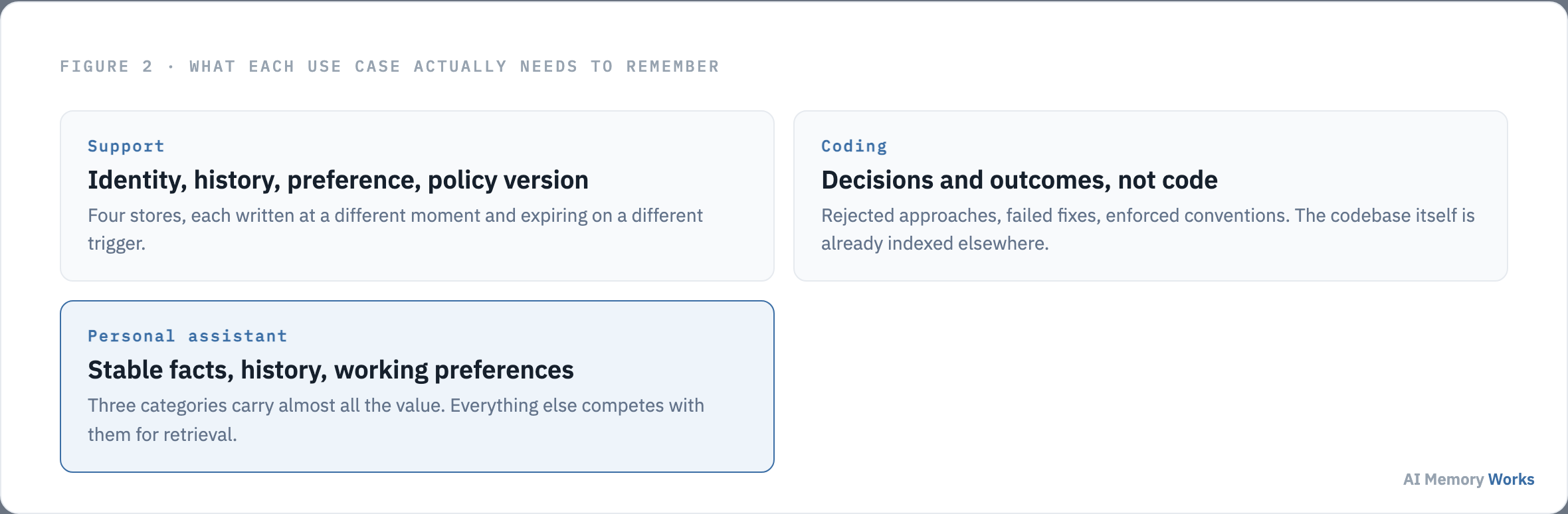
Customer support needs four things: who the customer is and what they’re entitled to, what’s already been tried, how they want to be dealt with, and which version of a policy applied to them at the time, since policies change and the one in force on the purchase date is what matters, not the one published today. Coding agents need decisions and outcomes, not code: which approach was rejected and why, which fix failed against which error, which conventions the team actually enforces in review. Personal assistants need three categories that carry almost all the value: stable facts about the person, the history of what’s already been discussed, and the working preferences that shape how output should look, with everything else usually diluting retrieval rather than adding to it.
Deciding what to remember is only half the design problem. The other half, what should never make it into storage at all, turned out to be a question every one of the three pages answered independently, and the answers converge more than any single page states. What should never be written to memory, in any use case?
A cross-cutting pattern
What should never be written to memory, in any use case?
Anything shared to verify or transact, not to be remembered, and the filter for it has to sit at write time, not read time. This isn’t stated as a shared rule on any single sub-page; it’s a pattern visible only by reading all 3 together.
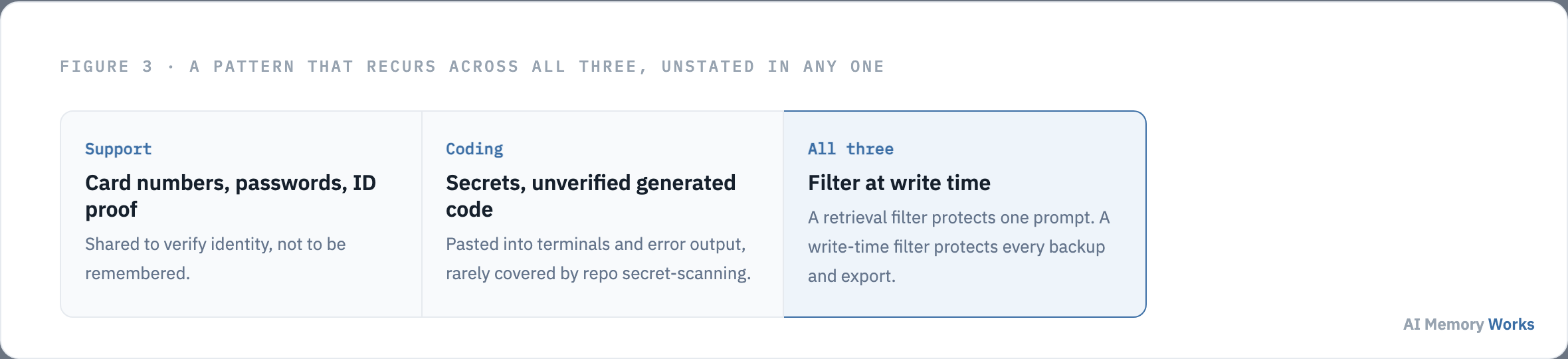
Support conversations routinely carry card numbers, passwords, one-time codes, and government identifiers, shared to prove identity rather than to be remembered, and an extraction step not explicitly told to drop them will store them. Coding agents face the same problem from a different direction: secrets pasted into a terminal or leaked into error output, and code the agent generated itself but never verified, neither of which is typically covered by the secret-scanning that protects the actual repository. The reason both pages land on filtering at write time rather than at retrieval is the same: a retrieval filter only protects the current prompt, but once something sensitive is in the store, it’s in the backups, the analytics export, and every downstream index built from it, and a deletion request now has to reach all of them rather than one place. Personal assistant memory carries the same discipline in a softer form: something shared while discussing one topic shouldn’t surface while discussing an unrelated one, even when similarity search rates it relevant, which is the same “not everything volunteered belongs in permanent memory” principle applied to context rather than content.
What to remember and what to filter both point toward the same underlying design decision: which memory type is actually doing the load-bearing work in each case. Which memory type carries the most weight in each case?
The dominant type
Which memory type carries the most weight in each case?
Support leans on semantic identity plus episodic history with a temporal twist; coding leans on procedural memory of decisions rather than facts; personal assistants split fairly evenly across semantic, episodic and procedural, with procedural specifically being what separates an assistant that improves from one that merely remembers.
In support, identity and entitlement facts are semantic memory, usually synchronized from a CRM rather than owned independently, while ticket history is episodic memory whose value is the outcome of a prior attempt, not the transcript of it. In coding, the memory that matters most is procedural: not what the code says, since that’s already indexed elsewhere, but what was learned about the codebase’s constraints, which is a category most teams underbuild because it doesn’t map cleanly onto “store a fact.” In personal assistants, semantic memory does the bulk of the retrieval work, episodic memory supplies day-to-day continuity, and procedural memory, the working preferences that shape how output should look without being asked each time, is specifically what makes the difference between an assistant that feels static and one that visibly gets better at working with a specific person.
Knowing which memory type dominates shapes which tool actually fits the job, and the deciding question is different in each case rather than one universal checklist. What actually decides which memory tool fits?
Choosing a tool
What actually decides which memory tool fits?
A different question in each use case, not one universal criterion that applies everywhere. Picking a memory tool by feature checklist alone misses the specific thing that actually predicts whether it will work for a given use case.
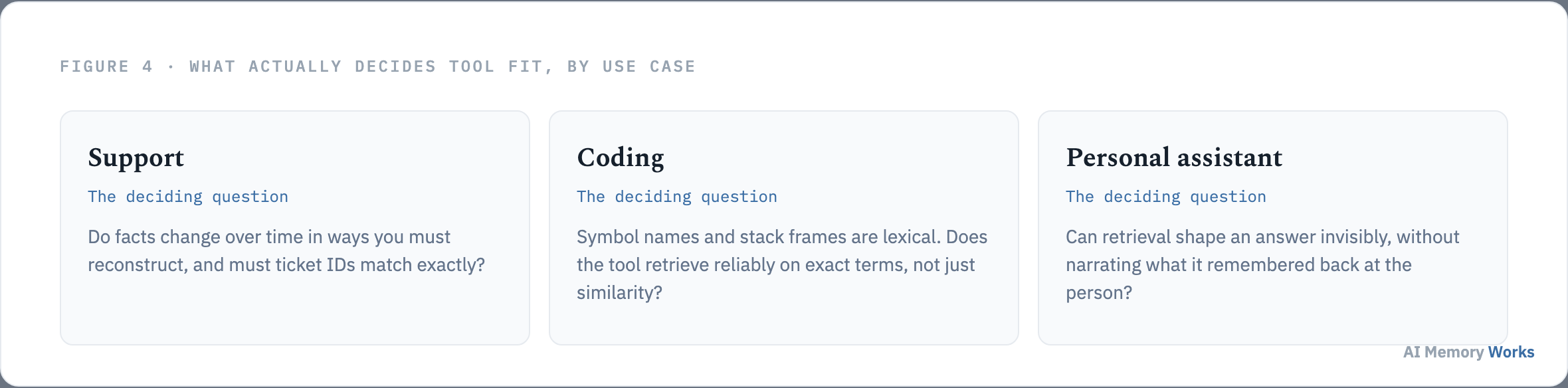
For support, the deciding question is whether facts change over time in ways that must be reconstructed as of a specific date, and whether ticket IDs and error codes need to match exactly rather than approximately, both more common here than in the use cases these tools are usually demonstrated on. For coding agents, the deciding question is whether the tool retrieves reliably on exact terms: symbol names, error strings, and stack frames are lexical, and a tool that only does similarity search will retrieve unreliably on exactly the queries a developer actually types. For personal assistants, the deciding question is whether retrieval can shape an answer invisibly rather than narrating what it remembered back at the person, since an assistant that announces its own recall reads as surveillance even when the underlying memory system is technically working correctly. Each sub-page goes deeper into the specific tools that fit its own deciding question: customer support, coding agents, and personal assistants.
These three cases don’t exhaust what memory gets used for. The same four questions this hub has walked through apply just as well to a use case none of the three sub-pages covers. How do you apply this to a use case not covered here?
Beyond these three
How do you apply this to a use case not covered here?
Ask the same 4 questions this hub answered for support, coding and personal assistants: what’s actually at stake if memory gets it wrong, what short list is worth remembering, what should never be written regardless of how useful it seems, and what specific question decides tool fit for this case. The pattern generalizes even when the specific answers don’t.
Every use case this site covers, and any one a team is building that isn’t listed here, sits on the same underlying loop: write, retrieve, and forget, described in full on how AI memory works. What changes case to case is never the mechanism, it’s the stakes, which determine what earns a place in memory and what has to be filtered out before it ever gets the chance. Teams building a use case not covered on this hub can start from that same four-question framework rather than starting from a blank page, and for teams that want the underlying write, retrieve and filter pipeline handled as a managed service rather than assembled from scratch regardless of which use case they’re building for, Engram is worth evaluating directly.
FAQ
Frequently asked questions
The cross-use-case decisions that follow once the comparison above is understood.
Is one memory type enough for every use case?
No. Each use case leans on a different dominant memory type: support leans semantic plus episodic, coding agents lean procedural, personal assistants split across all three. Building only semantic memory for a coding agent, for instance, misses where most of the value actually is.
Should support and personal assistant memory use the same filtering rules?
The underlying discipline is the same, filter at write time rather than retrieval, but what gets filtered differs. Support filters identity-proof details like card numbers; personal assistants filter by context, keeping a memory from surfacing outside the situation it was shared in.
Why does a coding agent need memory if it can already read the codebase?
Reading the codebase shows what the code currently does, not what was already tried and rejected, or why. That decision history is what memory adds; the code itself is already indexed elsewhere.
Does personal assistant memory need to be more conservative than support memory?
In a specific sense, yes. Support memory serves an operational need with clear entitlement stakes; personal assistant memory has to additionally avoid feeling like surveillance, which pushes toward storing fewer, more durable facts and never narrating what was recalled.
What's the first question to ask when building memory for a new use case?
What's actually at stake if memory gets it wrong. That answer determines which memory type to prioritize and what has to be filtered before storage, more than any generic architecture checklist does.
Can the same memory tool serve more than one of these use cases at once?
Often yes at the infrastructure level, but the deciding criterion for fit differs per use case: temporal reconstruction for support, exact lexical retrieval for coding, and invisible retrieval for personal assistants. A tool strong on one axis isn't automatically strong on the others.