AI memory knowledge base · 89 guides · Updated September 2026
What Is AI Memory? The Complete Guide for AI Agents
AI memory is the external system that lets AI agents store, recall and reuse information across time, turning stateless LLM calls into agents that remember users, facts and past interactions. This guide covers the memory types, the write, store, retrieve and forget loop, the frameworks that implement it in 2026, and the benchmarks that measure whether any of it works.
The agent memory loop
Definition
What is AI memory?
AI memory is a persistent state held outside the model that an agent writes to and reads from, so that information survives beyond a single inference call. It is the mechanism that makes an LLM agent stateful, and it runs five operations: write, store, retrieve, update and forget.
The word covers two things people often merge. There is the short-term memory inside the prompt, which is the context window, and the long-term memory outside it, which is a database the agent searches. Both are memory, and almost every production system runs both at once.
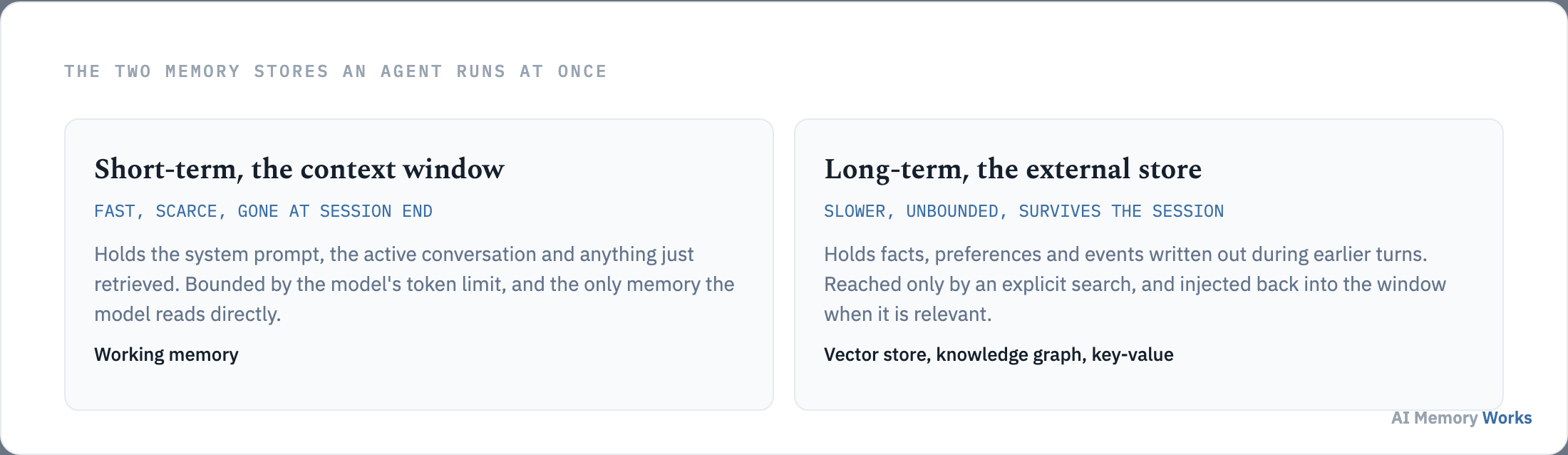
Nothing here changes the model’s weights. That is the line between memory and training, and it is why memory can be corrected in a second while fine-tuning cannot.
Whether an agent needs any of this depends on what breaks without it: why AI agents need memory.
Motivation
Why do AI agents need memory?
Because a language model is stateless: every call starts from nothing, and anything not placed in the prompt does not exist for the model. Without memory an agent cannot recognise a returning user, cannot stay consistent across a long task, and cannot learn from what already went wrong.
Three failures follow directly, and they are the ones users actually complain about.
- It forgets the user. Preferences stated last week are gone, so people re-explain themselves every session.
- It contradicts itself. Facts established early in a long conversation fall out of the window and the agent asserts the opposite later.
- It repeats mistakes. With no record of what was tried, an agent will take the same failed path again.
The full argument, including where a stateless design is genuinely fine, is on why AI agents need memory and stateless versus stateful LLMs.
Once memory is required, the first question is which kind, because the word covers several distinct stores: the types of AI agent memory.
Taxonomy
What are the types of AI agent memory?
Most sources name four types, working, semantic, episodic and procedural, and this knowledge base covers six by adding sensory or buffer memory and shared memory across agents. The four-type framing is borrowed from human cognition and it is the right starting point; the extra two matter once a system reaches production.
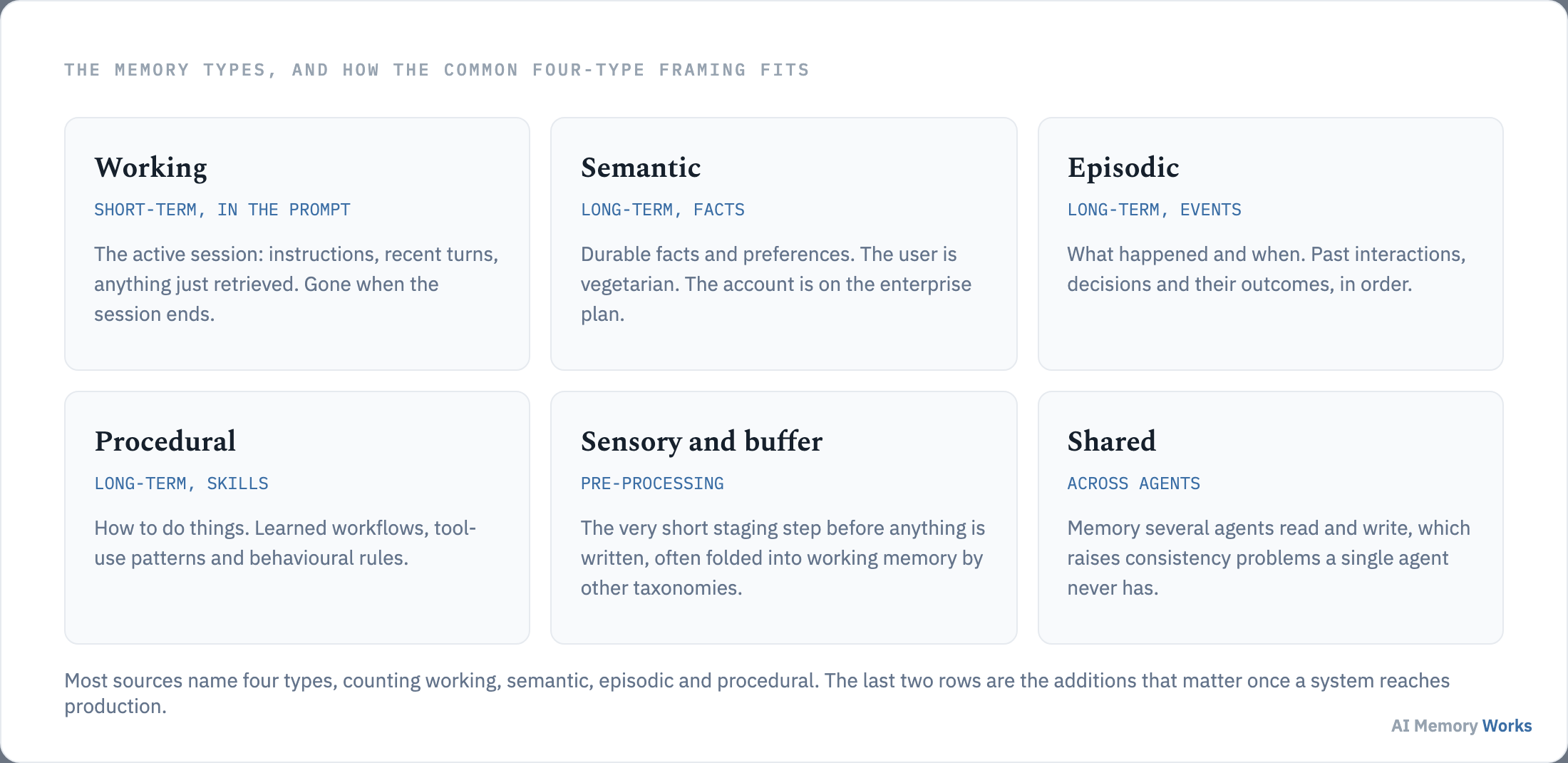
Each type answers a different question, which is why a system usually needs more than one.
- Working memory holds the active session, and it is the context window itself. See short-term memory in AI agents.
- Semantic memory holds durable facts and preferences. See semantic memory.
- Episodic memory holds what happened and when. See episodic memory.
- Procedural memory holds learned skills and workflows. See procedural memory.
- Sensory and buffer memory is the staging step before anything is written. See sensory and buffer memory.
- Shared memory is read and written by several agents at once. See shared memory in multi-agent systems.
The video below walks the four-type version of this taxonomy, which is the framing most teams meet first.
Types describe what is stored. The next question is the mechanism that puts things in and takes them out: how AI memory actually works.
Mechanism
How does AI memory work?
AI memory works as a loop that runs on every turn: the agent writes what matters, stores it, retrieves the relevant parts before answering, and forgets or updates what has gone stale. Every framework implements the same four operations with different backends.
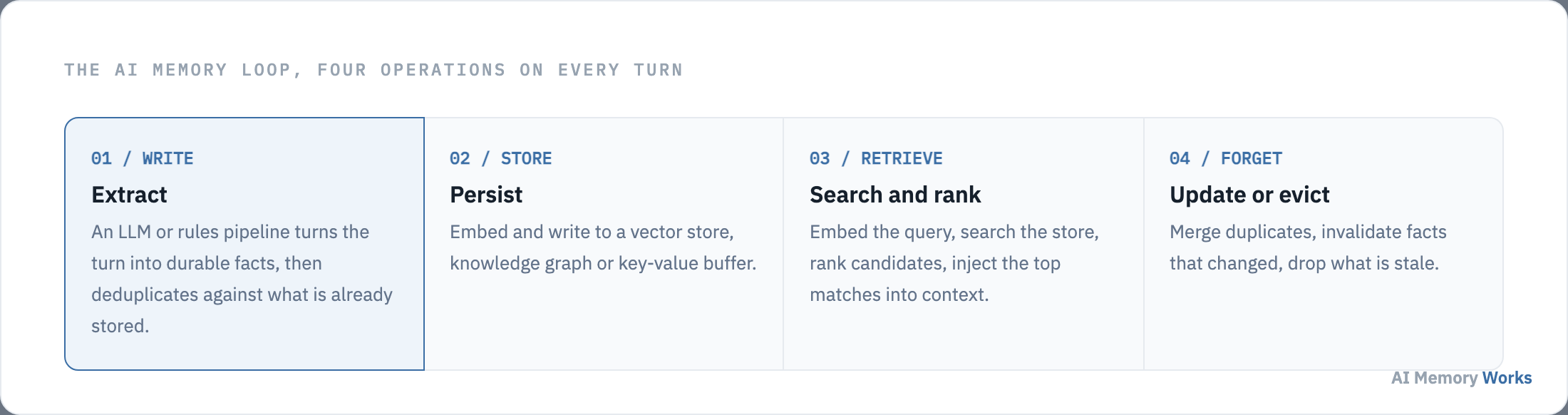
- Write. An extraction step turns the turn into a small number of durable facts and deduplicates them against what is already stored.
- Store. Those facts are embedded and persisted to a vector database, knowledge graph or key-value buffer.
- Retrieve. Before each response the agent searches, ranks and injects the top matches into the context window.
- Forget and update. Duplicates merge, changed facts invalidate their predecessors, and stale entries are evicted.
Each operation is a design decision with its own failure mode, walked step by step in how AI memory works.
Memory is easy to confuse with two neighbouring techniques, and choosing the wrong one is a common and expensive mistake: how memory differs from the context window, RAG and fine-tuning.
Distinctions
How is AI memory different from the context window, RAG and fine-tuning?
Memory is written by the interaction and updated at conversation speed; RAG reads a fixed corpus somebody else maintains; fine-tuning bakes knowledge into weights and cannot be changed mid-conversation. The context window is not an alternative at all, it is the working memory all three end up writing into.
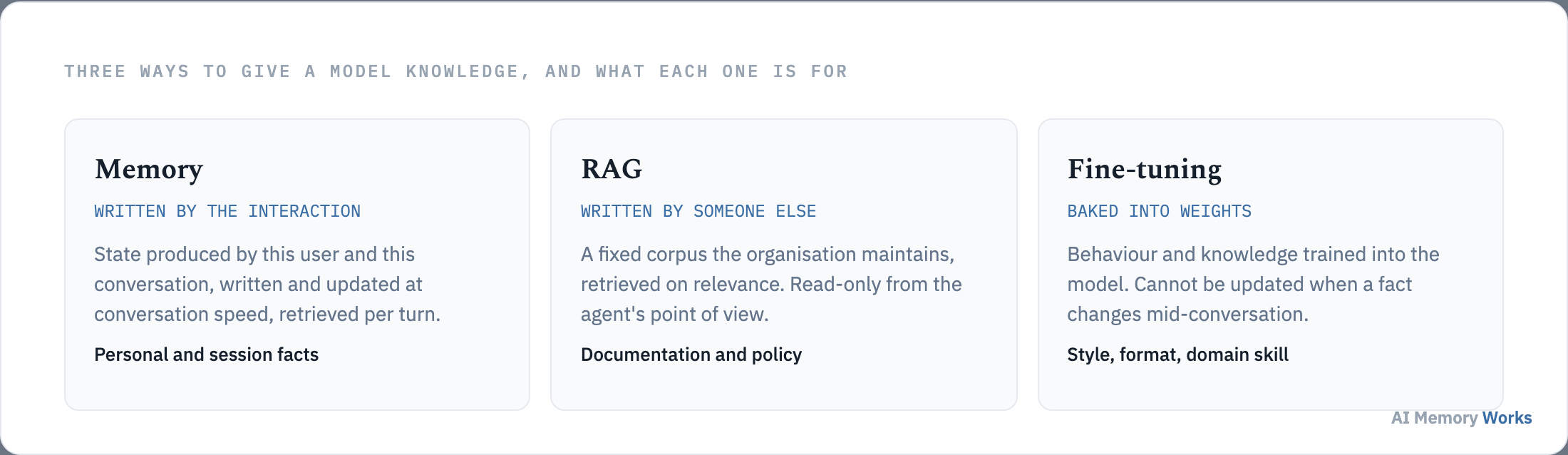
Most real systems run more than one. RAG supplies organisational knowledge, memory supplies the personal and session state, and fine-tuning shapes behaviour and format. The three comparisons are made in full on memory versus context window, memory versus RAG and memory versus fine-tuning.
With the distinctions settled, the practical question is which software to use: the best AI memory tools in 2026.
Tools
What are the best AI memory tools in 2026?
The shortlist is Engram (Weaviate), Mem0, Zep, Letta (MemGPT), LangMem and Cognee, and the right choice is decided by the workload rather than by a ranking. A memory API suits per-user facts, a temporal graph suits facts that expire, paging suits very long conversations, and framework-native memory suits teams already running a framework.
The benchmark position, stated plainly: Letta reports 93.4% on the Deep Memory Retrieval task with GPT-4 Turbo against 35.3% for the same model with no memory (Packer et al., arXiv:2310.08560), Zep reports 94.8% on the same task (Rasmussen et al., arXiv:2501.13956), and Mem0 reports a LOCOMO judge score of 66.9 against 72.9 for a full-context baseline that costs roughly fifteen times the tokens (Chhikara et al., 2025). Two of those three were reported by the tool’s own authors.
The full comparison, with deployment models and the limitation attached to each tool, is on the best AI memory tools, and the per-tool alternatives on Mem0 alternatives, Zep alternatives and Letta alternatives.
Choosing a tool is not the same as wiring it in, which is the next step: how to add memory to an AI agent.
Implementation
How do you add memory to an AI agent?
In four decisions: pick a store, pick the layer that manages it, decide when memories are written, and decide when they are retrieved. Everything else is detail on top of those four.
- Pick a store. A vector database, a knowledge graph, Redis, or a managed API that hides the choice.
- Pick a memory layer. Engram, Mem0, Zep, Letta, LangMem, or your own code over the store.
- Decide the write trigger. End of turn, explicit tool call, or a background job that runs between sessions.
- Decide the retrieval policy. What to search, how many memories to inject, and how to rank them.
Orchestrators such as CrewAI and n8n do not change any of this: the memory loop is the same underneath. The step-by-step build is in how to add memory to an AI agent, and the longer-lived version in how to build long-term memory.
Implementation raises architecture questions that recur in every build: the mechanisms underneath AI memory.
Architecture
What mechanisms sit under AI memory architecture?
Six mechanisms do most of the work: writing, retrieval, scoring, consolidation, forgetting, and the tiering that decides where a memory physically lives. They are the parts every framework implements, however it packages them.
- How do agents write and store memories? Extraction, deduplication and the write trigger.
- How do agents retrieve the right memory? Search, ranking and injection.
- How are memories scored and ranked? Recency, importance and relevance.
- How is memory consolidated? Merging and promoting between sessions.
- How do agents forget? Decay, time to live and pruning.
- What is a tiered memory hierarchy? Hot, warm and cold storage.
The infrastructure those mechanisms run on, from vector databases to knowledge graphs and embeddings, sits one layer below in the infrastructure cluster.
Mechanisms matter most where they change a product outcome: where AI memory matters most.
Applications
Where does AI memory matter most?
Wherever the same person comes back, or one task runs longer than the context window. Those two conditions cover most of the products where memory changes the experience rather than the architecture diagram.
- Customer support agents, where a returning customer should not have to re-explain the case.
- Personal assistants, where the value is entirely in accumulated knowledge of one person.
- Coding agents, where the conventions of a codebase have to persist across sessions.
The shape of the requirement differs by product. A support agent needs episodic memory of the case history and semantic memory of the account. A personal assistant leans almost entirely on semantic memory about one person. A coding agent needs procedural memory of a codebase’s conventions, which is closer to a learned workflow than to a fact. Multi-agent systems add a problem none of the others have, because several agents write to the same store and can contradict each other, covered on shared memory in multi-agent systems.
There is also a cost argument that decides many of these builds. Selective retrieval is cheaper than resending the transcript: on the LOCOMO benchmark, Mem0 reports roughly 1,800 tokens per query against 26,000 for a full-context baseline, with p95 latency of 1.44 seconds against 17.1 seconds (Chhikara et al., 2025). Memory is frequently adopted for that reason before anyone argues about accuracy.
Whether it works at all is a measurable question, answered by LOCOMO and LongMemEval, with the metric set on memory metrics.
New terms arrive quickly in this field, and the definitions are kept in one place: the AI memory glossary.
Reference
Where can you look up AI memory terms?
The glossary defines the vocabulary this field uses, from working memory and archival storage to consolidation, eviction and temporal invalidation. It is the fastest way to check a term without reading a whole guide.
See the AI memory glossary for the full list, or start with the entries most people arrive looking for: the context window problem, context engineering and AI memory compared with human memory.
FAQ
Frequently asked questions
The questions that come up most often once the loop is clear, covering cost, privacy and what memory does not solve.
What is AI memory?
AI memory is the system that lets AI agents store, recall and reuse information across time — external to model weights. It includes write, store, retrieve, update and forget operations that turn stateless LLMs into agents that remember users, facts and past interactions.
Why do AI agents need memory?
LLM APIs are stateless by default — every session starts blank. Without memory, agents repeat questions, cannot personalize, cannot learn across sessions, and eventually overflow the context window. Memory provides continuity, personalization, knowledge accumulation and lower token cost. See why AI agents need memory.
Is AI memory the same as RAG?
No. RAG retrieves from a fixed document corpus at query time. AI memory is dynamic and personal — it stores user preferences, past interactions and session-specific facts that update over time. They combine well: RAG for org knowledge, memory for user/session state. See AI memory vs RAG.
What is the difference between AI memory and the context window?
The context window is working memory — everything the model sees in the current prompt. It is temporary and has a hard size limit. AI memory persists in external stores across sessions and turns. See AI memory vs context window.
What is the best AI memory tool?
It depends on your stack. Engram (Weaviate) for Weaviate-native stacks; Mem0 for fast personalization APIs; Letta for virtual-context paging; Zep for temporal knowledge graphs; LangMem for LangGraph. See our benchmark-ranked best AI memory tools comparison.
How do I add memory to an n8n or CrewAI agent?
The pattern is the same for any framework: pick a memory store (Engram, Mem0 API, Zep, Redis, or a vector DB), wire extraction on each turn, and inject retrieved memories into the prompt. Framework-specific steps are in our add memory to an AI agent guide.
Should I use AI memory or fine-tuning?
Fine-tuning bakes knowledge into model weights — expensive to update and not session-personal. Memory keeps knowledge external, updatable and per-user. Use fine-tuning for stable domain style; use memory for facts, preferences and history that change. See AI memory vs fine-tuning.
What are the types of AI agent memory?
The main types are working (short-term) memory in the context window, and long-term memory in external stores — including episodic (past events), semantic (facts), procedural (skills) and shared (multi-agent). Full taxonomy: types of AI agent memory.
How do I test AI agent memory quality?
Use public benchmarks LOCOMO (long-conversation recall) and LongMemEval (cross-session recall), plus track accuracy, retrieval latency and token cost. See the evaluation hub and LOCOMO / LongMemEval explainers.
Open source or managed AI memory — which should I choose?
Open-source/self-hosted gives control and lower marginal cost but more ops. Managed APIs (Engram, Mem0 Cloud, Zep Cloud, Supermemory) ship faster with less infrastructure. Decision guide: open-source vs managed AI memory.
What AI memory do customer support bots need?
Support bots need episodic memory (ticket history), semantic memory (product facts) and per-user memory (preferences, past issues). See AI memory for customer support agents.