Tools · LangChain ecosystem
LangMem: Long-Term Memory for LangChain Agents
LangMem is a Python SDK from LangChain that decides what an agent should remember, on top of the store LangGraph already provides. It stores nothing itself. What it contributes is extraction, memory tools the agent can call, a background memory manager, and a prompt optimiser that rewrites an agent’s own instructions from feedback, which is a capability no other memory library in this category offers.
The split
Definition
What is LangMem?
A library of memory primitives for agents built on LangChain and LangGraph, released by the LangChain team in February 2025 and installed with pip install -U langmem. Its stated purpose is to help agents learn from their interactions rather than to give them somewhere to put data.
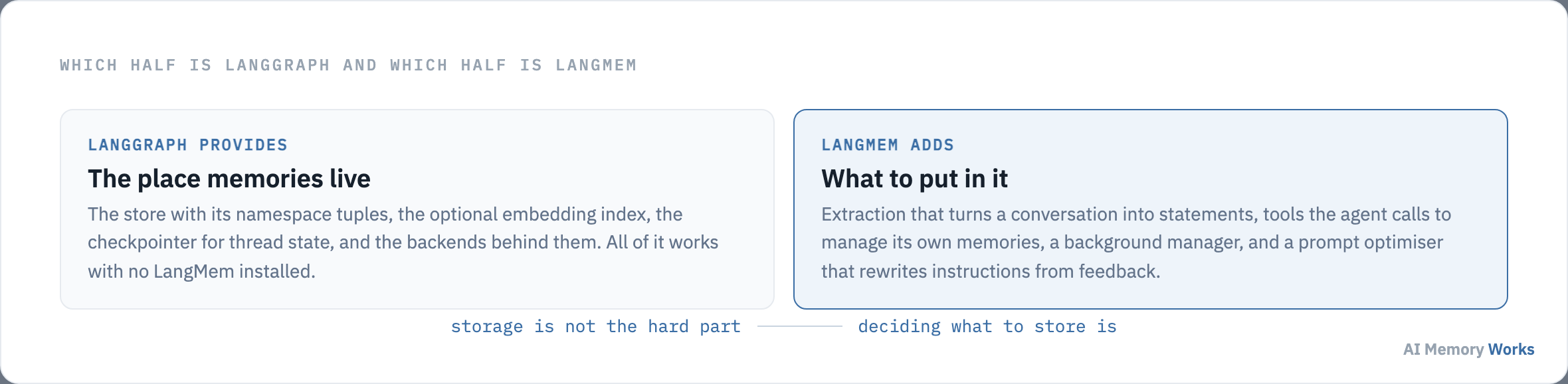
That distinction is the one thing worth getting right before reading anything else about it. Persistence, namespaces and the optional embedding index belong to LangGraph’s store and work with no LangMem installed. LangMem is the layer that turns a conversation into statements worth keeping, and that lets an agent search and revise them.
The library’s own documentation describes its core API as usable with any storage system and any agent framework, with a deeper integration for LangGraph specifically. In practice almost everyone uses it the second way, which makes the boundary between the two easy to lose sight of.
Losing sight of it leads to the most common question about the library, which is what it is doing that the store was not already doing: where LangMem actually stores memories.
Storage
Where does LangMem actually store memories?
In LangGraph’s store, under a namespace you choose, in whatever backend that store is configured with. LangMem has no database of its own, which is why the storage decision is made entirely outside it.
The store is addressed by a namespace tuple rather than a single key, and the root of that tuple is the boundary that keeps one user’s memories away from another’s. LangChain’s own guidance is to root the namespace at a user ID; the library’s launch post makes the same point, noting that namespaces can also scope memories to a team, to an application route, or to every user at once when the thing being learned is a shared procedure.
Two operational details cause most of the surprises. The first is that semantic search over the store requires an embedding index to be configured when the store is created, and without one a search returns nothing rather than raising an error, so the failure looks like an empty memory rather than a missing setting. The second is that the in-memory store used in every quickstart discards everything when the process exits, and moving to a durable backend is a deliberate change you have to make.
Which backend that should be is a separate decision with its own trade-offs, covered on storage backends for agent memory. LangGraph ships adapters for the common ones.
There is a second persistence layer in the same framework, and confusing the two is the single most common way a LangGraph agent ends up forgetting everything: the difference between a checkpointer and a store.
The common mistake
What is the difference between a checkpointer and a store?
A checkpointer saves the state of one conversation so it can be resumed; a store holds memories that outlive every conversation. An agent compiled with only the first appears to remember perfectly within a session and remembers nothing the next day.
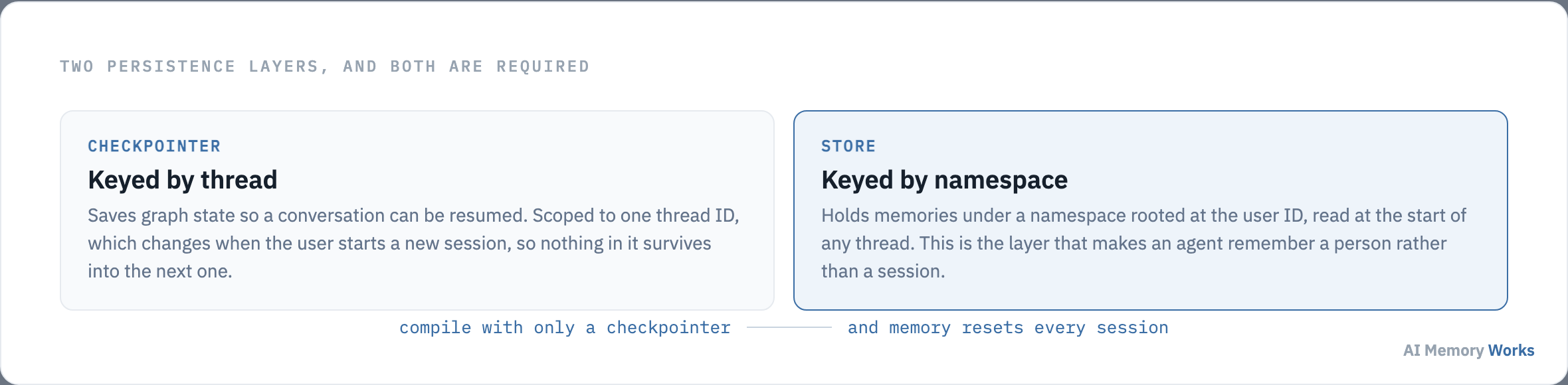
The keys tell you which is which. A checkpointer is keyed by thread, and a thread is one session, so a new session means a new key and an empty starting state. A store is keyed by a namespace rooted at the user, and one user has many threads, so anything written there is available at the start of all of them.
The practical rule is that both are compiled into the agent, not one. Session continuity and durable memory are different jobs and neither substitutes for the other. Storing a user’s stated preference in the checkpointer is the version of this mistake that looks like it works, because the preference survives right up until the session ends.
This is the framework-specific form of a distinction that applies to every memory system, treated generally on short-term versus long-term memory. It is also the reason the older LangChain conversation memory classes were superseded: they held a buffer for the current exchange and had no answer for the next one.
With the storage layer settled, the question LangMem exists to answer is what should be written into it: how LangMem decides what to remember.
Formation
How does LangMem decide what to remember?
Either the agent decides during the conversation by calling a tool, or a manager decides afterwards by reading the transcript. The library’s documentation calls these conscious and subconscious formation, and choosing between them is the main design decision the SDK puts in front of you.
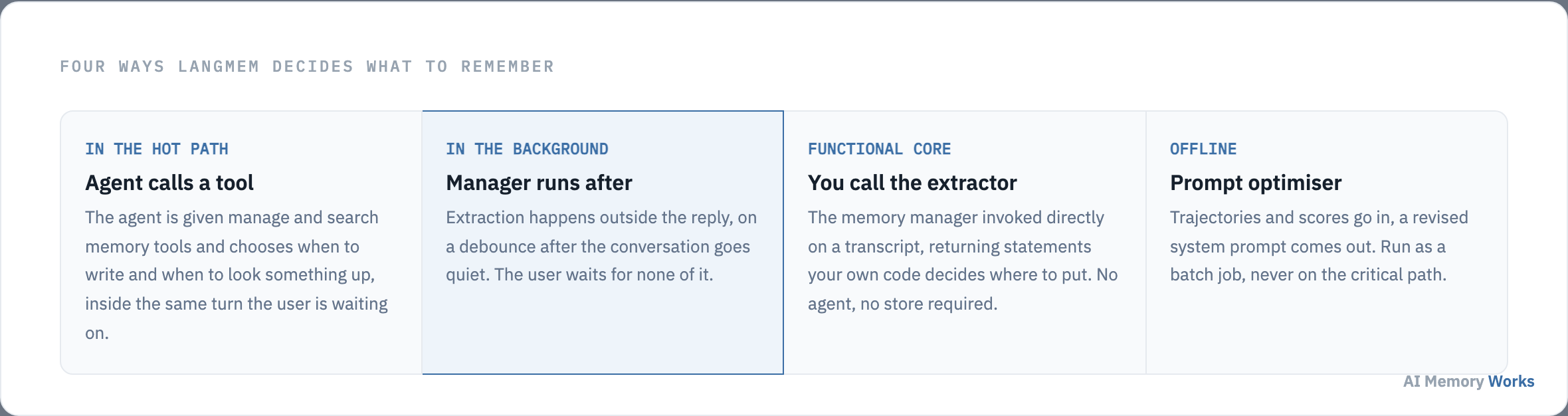
In the hot path, the agent is handed two tools, one to manage memories and one to search them, and it calls them as part of answering. The appeal is that the agent knows what mattered in the exchange it just had. The cost is that every call happens while the user waits, and that the model now has two more tools competing for its attention.
The video below is LangChain’s own walkthrough of the semantic memory case, linked from the SDK’s launch post.
In the background, a memory manager reads the conversation after the fact, on a debounce so that a burst of messages produces one extraction rather than ten. Nothing is added to the reply the user is waiting for, and the extraction can afford to be more careful because nothing is blocked on it. There is one trade-off worth naming: a memory formed after the conversation is not available during it, so a fact stated in the first message cannot be recalled in the third.
The same extraction logic is also callable directly, with no agent and no store involved, which is the form to reach for when you already have a pipeline and only want the part that turns a transcript into statements. The general version of that decision is on how agents write and store memories.
One of the four patterns writes something other than facts, and it is the capability that makes this library distinct: whether an agent can rewrite its own prompt.
The differentiator
Can an agent rewrite its own prompt with LangMem?
Yes, and this is the part of LangMem that has no equivalent in the other memory libraries. A prompt optimiser takes conversation trajectories with scores or comments attached and returns a revised system prompt, so what the agent learns is a behaviour rather than a fact.
The mechanism is worth stating plainly, because “self-improving agent” invites more imagination than the feature deserves. Trajectories go in, each one a conversation plus a judgement of how it went. The optimiser looks for patterns in what worked and what did not, and proposes an edit to the instructions. The launch post describes several strategies for producing that edit, including one that reflects before proposing, one that separates critique from rewriting, and a single-step version.
What this buys you is procedural memory, the kind that holds how to do something rather than what is true. An agent told repeatedly that its answers are too long can end up with an instruction saying so, without anyone editing a prompt file. The type itself is covered on procedural memory.
Two cautions. The optimiser is a batch job, not something to run inside a request, and the output is a prompt that will govern every future conversation, so it deserves review before it ships. A memory that changes one answer is recoverable; an instruction that changes all of them is a deployment.
Procedural memory is one of three types the library speaks about, and the other two are handled quite differently: which memory types LangMem supports.
Coverage
Which memory types does LangMem support?
Semantic memory through extraction and search, procedural memory through the prompt optimiser, and episodic memory only as a pattern you implement yourself. The launch post is explicit that the library does not ship opinionated utilities for the episodic case.
Semantic memory is the well-supported path and the one most teams arrive wanting: facts about a user, their preferences, the entities they talk about and the relations between them. Extraction produces statements, the store holds them, and search retrieves them. LangChain’s own framing notes this is also where memory overlaps most with retrieval over a document corpus, and that if the knowledge already lives in a source of truth elsewhere, retrieving from that source directly may serve you better.
Procedural memory is covered by the optimiser described above, stored as prompt text rather than as rows.
Episodic memory, meaning distilled records of specific past interactions used as examples, is described in the library’s concepts and left to you to build with the primitives. That is not a fault so much as a scope decision, and it is worth knowing before you plan around it. The distinction between the first two types is on episodic versus semantic memory.
Support on paper is one thing, and behaviour under production load is another, which is where the published evidence gets uncomfortable: whether LangMem is fast enough for production.
Evidence
Is LangMem fast enough for production?
Not in the hot path, on the only published measurement available: search latency of 17.99 seconds at the median and 59.82 seconds at the ninety-fifth percentile on LOCOMO (Chhikara et al., 2025). Two things need saying alongside that number, and most write-ups repeating it say neither.
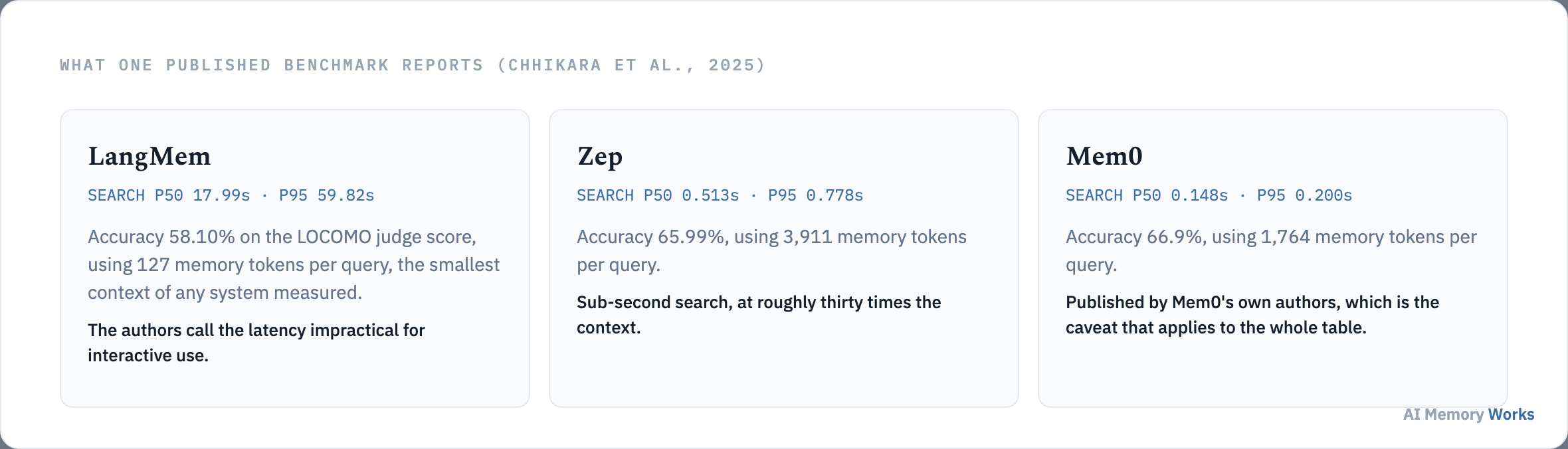
The first is provenance. That paper was written by the authors of Mem0, one of the systems in the same table, and the same table reports Mem0 as both the fastest and the most accurate. This is the ordinary situation in memory benchmarking rather than a scandal, and the correct response is to weight the result accordingly rather than to discard or repeat it uncritically. The general problem is covered on how to evaluate agent memory, and the benchmark itself on the LOCOMO benchmark.
The second is that the number is an argument about placement, not about the library. LangMem’s own documentation offers background formation precisely so that extraction and consolidation happen off the critical path. Measuring the slow path and concluding the library is unusable skips the pattern its authors recommend. Run formation in the background, keep retrieval to a plain store search, and the user waits on none of it.
One more figure in that table is easy to miss and points the other way: LangMem answered with 127 memory tokens per query, the smallest context of any system measured, against 1,764 for Mem0 and 3,911 for Zep. A system that is slow to search but frugal in what it injects has a different cost profile, and token cost is covered on reducing token cost with memory.
Performance is one adoption risk. The other is whether the library is still moving: whether LangMem is actively developed.
Adoption risk
Is LangMem still actively developed?
It is maintained but not advancing, and it has not been deprecated. That is a distinction worth drawing carefully, because the evidence points in one direction and no announcement has been made in either.
What the public repository shows, read on 4 September 2026: 149 commits, no tagged releases, and no change to the library’s source directory since July 2025. The commits since then are dependency bumps and documentation fixes, the kind of activity that keeps a package installable rather than the kind that adds capability.
What LangChain’s current documentation shows is the more telling signal. The long-term memory pages in the current documentation set explain the store API directly, with namespaces, writes and searches, and do not mention LangMem at all. The concepts the SDK introduced have been absorbed into the framework’s own documentation; the SDK is not where they are taught any more.
Read that as it stands rather than as a verdict. The library installs, the primitives work, and nothing about it has been withdrawn. What it means practically is that adopting LangMem today is adopting a stable surface rather than a growing one, and that if you need only semantic memory, the store the framework documents will do it without the extra dependency.
Which leaves the decision itself, against the alternatives: when to choose LangMem over the other memory tools.
The decision
When should you choose LangMem over Mem0, Zep or Engram?
Choose it when you are already on LangGraph and want procedural memory or background extraction; look elsewhere when you want a memory service with its own retrieval quality guarantees. The choice is narrower than the category suggests, because LangMem competes with a store rather than with a database.
- Engram suits a stack already built on Weaviate, where retrieval fuses vector and keyword search natively and memory lives beside the rest of your vector data. See Engram.
- LangMem suits a LangGraph application that wants the agent to manage its own memories, or an agent whose instructions should evolve from feedback, which nothing else here offers.
- A managed memory API suits a team that does not want to own extraction and retrieval quality at all. The trade-offs are on open source versus managed memory.
- The plain LangGraph store suits the many applications that need durable facts about a user and nothing more, and it is the option most often overlooked because it does not have a product name.
The honest default for a LangChain team is to start with the store, add LangMem when a specific primitive earns its place, and treat the prompt optimiser as the reason the dependency is there. A survey of the wider field is on AI agent memory frameworks and tools, and the head-to-head comparisons on the best AI memory tools.
Whichever you choose, the work that decides whether memory helps is upstream of the library: deciding what is worth storing, keeping it current, and checking that retrieval returns it. That work is the same on every stack, and it is covered on building long-term memory for an agent.
FAQ
Frequently asked questions
The questions that come up when a team is deciding whether to add this dependency.
Do you need LangGraph to use LangMem?
Not for the core API, which the library describes as usable with any storage system and any agent framework. The deeper integration, where the agent calls memory tools and a manager writes to the store for you, is LangGraph-specific, and that integration is why most teams install it.
Is LangMem free and open source?
The SDK is a public Python package installed with pip and developed in a public repository. Check the repository's licence file for the terms that apply to your use, and note that the model calls it makes for extraction and prompt optimisation are billed by whichever provider you configure.
Why does my LangMem memory search return nothing?
The usual cause is a store created without an embedding index, which makes semantic search return an empty list rather than an error. The second cause is a namespace mismatch between the write and the read. Both fail silently, so check the store configuration before suspecting extraction.
Does LangMem work with models other than Anthropic and OpenAI?
The extraction and optimisation components take a model identifier, so any provider your LangChain installation can initialise will work. The quality of extracted memories depends heavily on that choice, which is worth measuring rather than assuming.
Can LangMem memories be shared between agents?
Yes, through the namespace. Memories written under a namespace that several agents read are shared by construction, which is how a team-level or organisation-level memory is built. The design questions that raises are on shared memory.
Should you migrate off LangMem?
There is no reason to migrate a working system. If you use it only for semantic memory, the store LangGraph documents does the same job with one less dependency; if you use the prompt optimiser, nothing else in the category replaces it. Decide on that basis rather than on the library's release cadence.