Guides · Personalization
How to Add User Memory for Personalization
Personalization breaks otherwise-working agents for one recurring reason: context, session state and long-term memory get treated as one undifferentiated pile instead of three separately-scoped kinds of state, each with its own lifetime and its own place to live. Get that split right, add explicit admission rules for what’s worth remembering, and personalization becomes a design decision instead of a source of unpredictable behavior.
Three kinds of state
The root cause
Why does personalization break agents that work fine otherwise?
Because most first attempts collapse three genuinely different kinds of state, information needed right now, decisions scoped to today’s session, and preferences that should persist forever, into one undifferentiated blob, usually just appended to the prompt. Each of the three has its own lifetime, and conflating them produces a specific, predictable failure.
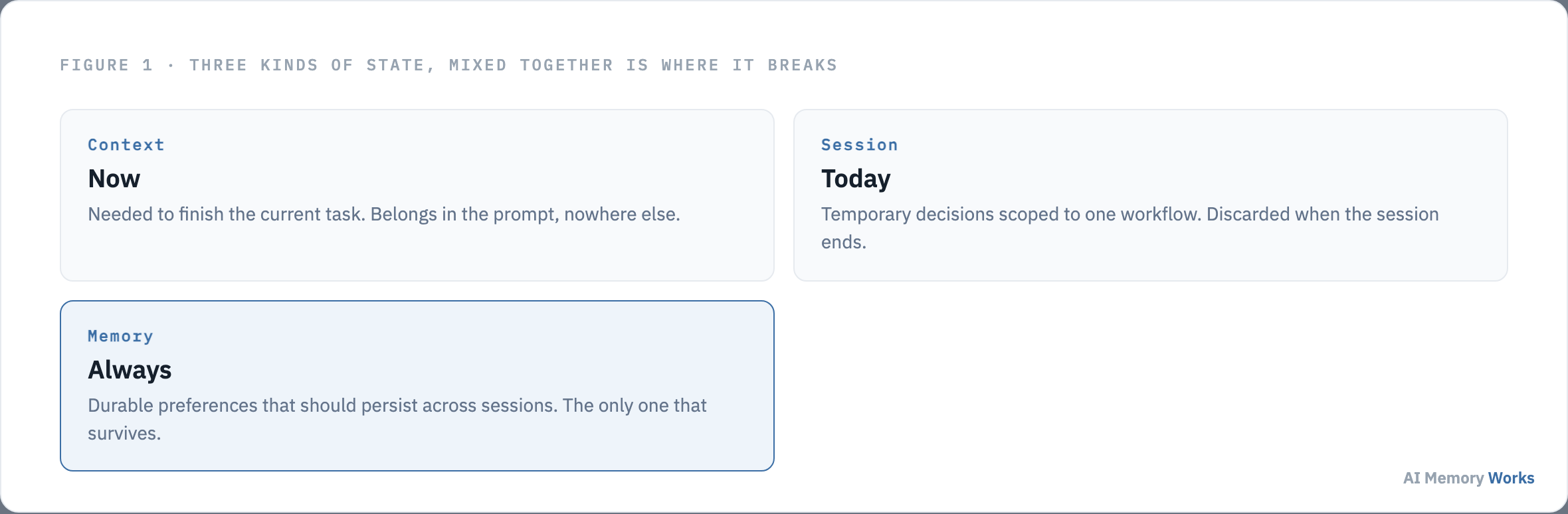
Context is information needed to finish the current task, and belongs in the prompt and nowhere else. Session state is a temporary decision or selection made during one workflow, structured and scoped to that session, then discarded once it ends. Long-term memory is the durable subset, facts and preferences that should genuinely persist across sessions. Storing long-term preferences directly in the prompt makes behavior unpredictable as the prompt grows uncontrollably; storing everything permanently makes memory grow without bound; failing to scope memory at all lets unrelated sessions bleed into each other. A personalized agent that survives production treats this three-way split as a first-class architectural decision, not an afterthought bolted on once the base agent already works.
The most common version of this mistake starts innocently: a team building a demo notices the agent forgets things between turns, and the fastest fix is appending more of the conversation history to the prompt on every call. This works right up until the history grows large enough that irrelevant details from twenty turns ago start influencing decisions about the current one, costs climb because every call now carries that accumulated weight, and debugging becomes genuinely difficult because there’s no clean separation between what the agent needs right now and what it’s carrying forward out of habit. None of that is a sign the underlying idea, personalizing responses to a specific user, was wrong. It’s a sign the three categories above were never actually separated, which is a design decision, not something a bigger context window or a better model quietly fixes on its own.
Getting the split right still leaves open exactly what a production-grade memory layer needs to actually do with the “always” category once it’s correctly identified. What does a production-grade personalization memory layer actually require?
What it actually needs
What does a production-grade personalization memory layer actually require?
Per-user isolation, semantic rather than exact-match retrieval, automatic extraction, update-and-consolidation instead of pure append, a tool-callable interface, and auditability, plus an explicit admission pipeline deciding what’s worth persisting in the first place.
Per-user isolation means memories are scoped to a specific identifier, often partitioned further by application or agent, so one user’s preferences never leak into another’s context. Semantic retrieval matters because personalized queries rarely use the exact words a stored preference was written in, “dog” should still match a preference stored about a golden retriever. Preferences change over time, so update-and-consolidation, merging or overriding an existing entry rather than only appending new ones, keeps the store from accumulating contradictions. A tool-callable interface matters for a less obvious reason: an agent that can explicitly call “search user memory” or “save this fact” as a discrete action keeps memory access visible and debuggable, compared to an implicit retrieval step baked silently into every prompt, where it’s much harder to tell after the fact what the agent actually saw. Auditability closes the loop, giving a developer or a compliance reviewer a way to inspect exactly what the system currently believes about a given user, which matters as much for debugging a wrong response as it does for answering a data request.
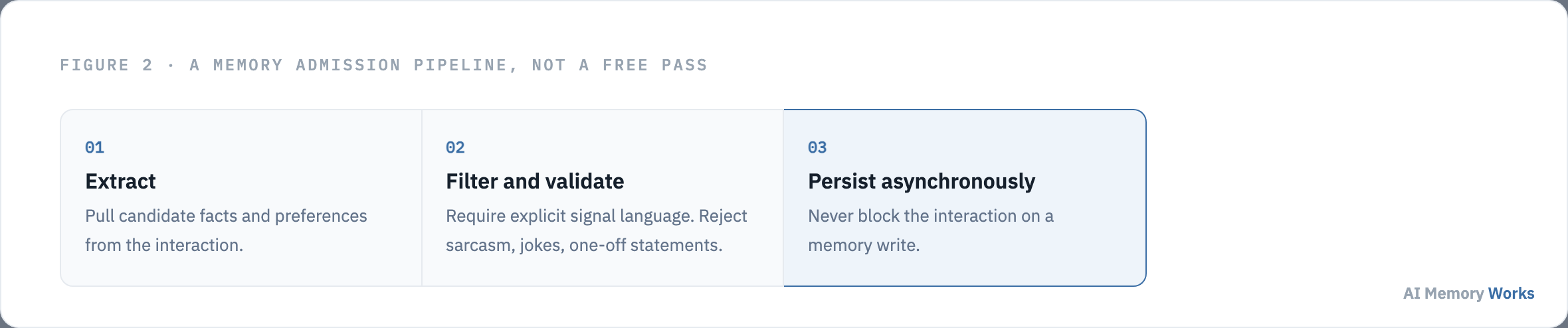
On top of these structural requirements sits the admission pipeline itself: extract candidate facts from the interaction, filter and validate them against explicit rules before persisting anything, and only then commit, asynchronously, so the write never blocks the actual interaction the user is waiting on.
That filter step, deciding what actually deserves to become a persisted memory, is where personalization systems most commonly go wrong in a specific, recurring way. What specifically goes wrong with extracted preferences?
The recurring failure
What specifically goes wrong with extracted preferences?
Naive extraction mistakes temporary, emotional, or sarcastic statements for permanent preferences, because nothing in a basic extraction step distinguishes “I hate meetings today” from an actual, lasting fact about how someone wants to work.
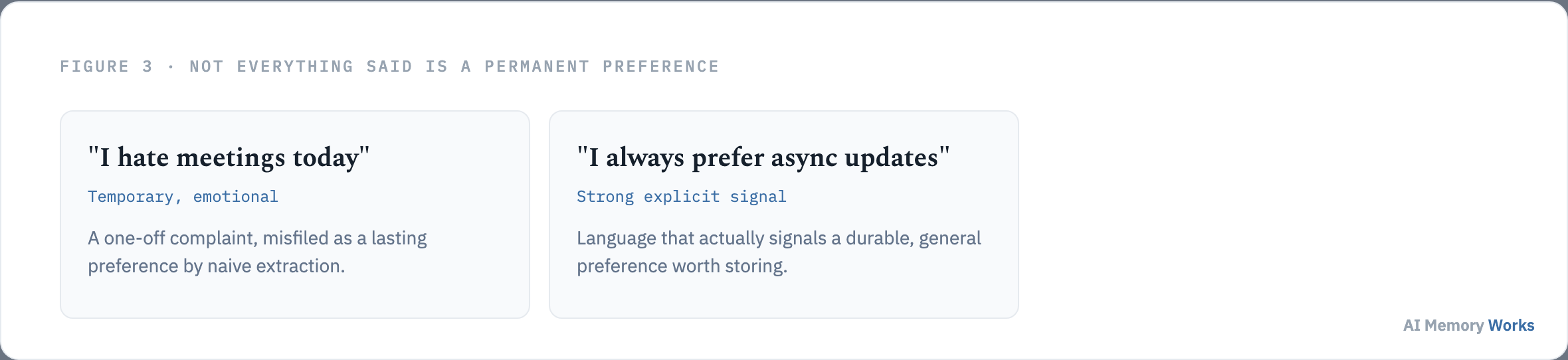
The practical mitigation is requiring strong, explicit signal language before a statement is promoted to durable memory, storing only statements that read like “I always prefer async updates” rather than an offhand complaint about one bad day, alongside occasional manual review for sensitive applications where a wrong inference carries real cost. A useful heuristic here: a statement phrased as a general rule, using words like “always,” “never,” or “prefer,” is a far stronger candidate for durable storage than a statement phrased as a reaction to something specific happening right now, even when both are grammatically similar first-person statements about how the user feels.
Two further, related pitfalls compound the same underlying problem: over-personalization, where an agent leans so heavily on stored preferences that it stops responding to what’s actually being asked in the moment, treating every interaction as an opportunity to demonstrate how much it remembers rather than actually answering the question in front of it, and leaky memory, where information that should have stayed scoped to one session quietly persists and starts influencing unrelated conversations, the personalization-specific version of the cross-session contamination described above. Both trace back to the same root cause as the state-mixing problem this page opened with: a boundary that wasn’t drawn clearly enough at write time, surfacing later as a symptom that looks unrelated to its actual cause.
Getting extraction right protects the system. A separate, equally important obligation is what the system owes the actual person whose preferences it’s storing. What does user memory owe the actual user?
Governance, not an afterthought
What does user memory owe the actual user?
Control over their own stored data, protection from sensitive information ever entering the store, a retention policy tied to actual consent, and an auditable record of every write, independently converged on by more than one published engineering guide’s research into this exact problem.
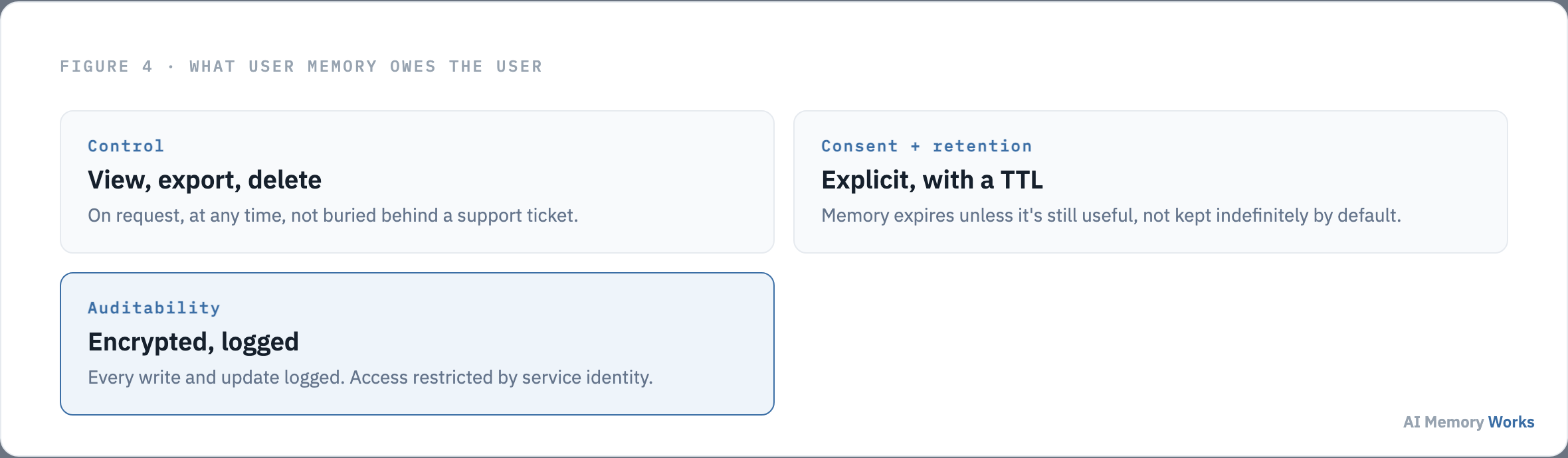
Users should be able to view, export and delete their stored preferences at any time, not through a support ticket but as a first-class capability of the system. Every candidate memory should pass through PII detection before persisting, since personalization systems that store secrets or personal identifiers alongside preferences create a compliance liability distinct from the personalization feature itself, covered in more depth on memory security. Persistent memory should require explicit consent and carry a retention window, so memory expires by default unless it’s still demonstrably useful, rather than accumulating indefinitely on the assumption that more stored history is automatically better. Writes should be encrypted at rest, access restricted by service identity, and every write or update logged, so a debugging session or a compliance review can reconstruct exactly what the system learned about a user and when.
None of this is optional once real users are involved, and treating it as a compliance checkbox to add before launch, rather than a property of the memory architecture itself, tends to produce exactly the retrofit problem this page warns against elsewhere: a delete request that has to reach the primary store, every backup, and every downstream analytics export separately, because the system was never built with a single, authoritative place a deletion could actually propagate from. Designing for deletion from the start, one authoritative store that every other copy defers to, is far cheaper than adding it after the fact.
With the state model, the requirements, the failure modes and the governance obligations all in place, what remains is assembling them into something that actually ships. How do you actually put this together?
Assembling it
How do you actually put this together?
Start from the three-way state split, build the admission pipeline as an explicit, inspectable step rather than an implicit side effect of extraction, and treat the governance checklist as a launch requirement rather than a follow-up task. Teams that build the memory layer as a genuine architectural decision from the start avoid the far more expensive rework of retrofitting isolation, consent and retention controls onto a system that was never designed to carry them.
A useful order to actually do this in: define the three-way state split and where each lives before writing any extraction code, design the admission rules and the explicit signal-language requirement next, since retrofitting stricter extraction after a store already contains misfiled preferences is far harder than starting strict, and only then wire up the governance layer, since it’s much easier to build deletion, consent and audit logging into a system from its first version than to bolt them on once real user data already exists in a store that wasn’t designed to support clean removal.
The general step-by-step process for wiring memory into an agent, including architecture choices and a worked example, is covered on adding memory to an agent; this page’s job has been the personalization-specific layer on top of that: what to remember, what to filter, and what the system owes the person whose data it’s storing. Personalization for the assistant product category specifically, including the harder UX question of memory that helps without feeling like surveillance, is covered on personal assistants. Teams that would rather adopt this pipeline as a managed capability than build and operate the admission, isolation and retention logic themselves can evaluate Engram directly against the build-it-yourself path described above.
FAQ
Frequently asked questions
The practical decisions that follow once the state model and governance requirements above are understood.
Should I scope user memory by device or by account?
By account identifier, not device. Scoping by device breaks the personalization the moment a user switches between web and mobile, since the same person now looks like two different users to the memory system.
Is fine-tuning a better way to personalize than user memory?
For dynamic, per-user facts and preferences, no. Fine-tuning bakes static patterns into model weights and can't update per user at runtime. Memory handles per-user, changeable facts; fine-tuning suits stable, domain-wide tone or behavior.
What should happen when a user asks to delete their stored data?
The deletion should propagate from one authoritative store to every downstream copy, backups and analytics exports included. This only works cleanly if the system was designed around a single source of truth for that data from the start.
Can a support bot use the same personalization approach as a consumer assistant?
The same state-splitting and admission-pipeline principles apply, but the specific facts worth storing differ: a support bot prioritizes plan tier, entitlements and ticket history, while a consumer assistant prioritizes stable personal facts and working preferences.
Should CRM data and agent memory be the same store?
Generally no. A CRM is typically the source of truth for account facts; agent memory holds conversation-derived preferences the CRM doesn't track. Keeping them separate, with the CRM feeding memory rather than the reverse, avoids conflicting writes to the same fact.
How often should personalization memory actually be reviewed for staleness?
On a retention window tied to consent, not indefinitely. A memory that's still influencing responses after the user's stated retention period, or after a fact has clearly changed, should be expired or re-confirmed rather than left to accumulate.