Guides · Cluster hub
How to Build Memory Into AI Agents
Building agent memory is four decisions made in a fixed order: whose memory it is, what is worth keeping, where it lives, and how it gets back into the prompt. Seven guides on this site implement those decisions. This page says which order to take them in, what the smallest working version looks like, and when the honest answer is that you do not need memory at all.
Four decisions
The work
What does building memory into an agent involve?
Adding a store outside the model, a rule for what goes into it, and a step that puts the right part of it back into the prompt before the agent answers. The model does not change and is not trained on anything. All of the work sits in your application code.
That is worth stating plainly because the phrase “give the agent memory” suggests something is being done to the model. Nothing is. The model reads a prompt and produces a reply, and memory is the practice of composing that prompt from more than the current conversation. The mechanics are set out on how AI memory works.
Three pieces of code do the whole job. A write path that decides what from an interaction is worth keeping and stores it. A read path that searches the store and selects a handful of memories. An injection step that places them into the prompt with a label saying what they are. Everything else, embeddings, graphs, consolidation, scoring, is a refinement of one of the three.
Two properties of that arrangement explain most of what follows. Memory is editable, so a fact can be corrected, superseded or deleted in one write, which is what makes it the right tool for anything a user might change their mind about. And it is selective by necessity, because the prompt has a budget and only a handful of memories can occupy it, so every design question eventually reduces to which few to load. The comparison with the alternatives, training on the information or pasting the whole history in, is on memory versus fine-tuning and memory versus the context window.
The reason this is more involved than it sounds is that each piece has a decision attached that is hard to reverse later, and the decisions are not independent: what to settle before writing any code.
Before the code
What should you decide before writing any code?
Four things: who the memory belongs to, what qualifies as worth remembering, how long each kind of memory should last, and who is allowed to read it. Answering these on paper takes an hour and saves a migration.
Who the memory belongs to is the identity question, and it is first because every row you ever write carries the answer as a key. A user, an account, an organisation, or a conversation are four different choices with different privacy consequences, and in products where several people share an account they are genuinely different systems.
What qualifies is the selection rule. The usable form is two tests applied at write time: would this change a future answer, and will it still be true next month. Both are covered on how agents write and store memories.
How long it lasts separates thread-scoped detail from durable facts. Getting this wrong in the permissive direction produces an agent that insists in June on something true for one afternoon in March, and the expiry mechanics are on forgetting and eviction.
Who can read it is the partition question. In a multi-tenant product a memory key that is too coarse is not untidy, it is a disclosure path, as set out on memory security.
Two of those four are expensive to change afterwards and two are not, which is what fixes the sequence: the order to build agent memory in.
Sequence
In what order should you build agent memory?
Scope first, then the selection rule, then the store, then retrieval. The ordering follows from reversibility: the first two decisions are baked into every row you write, and the last two can be replaced later without touching what is already stored.
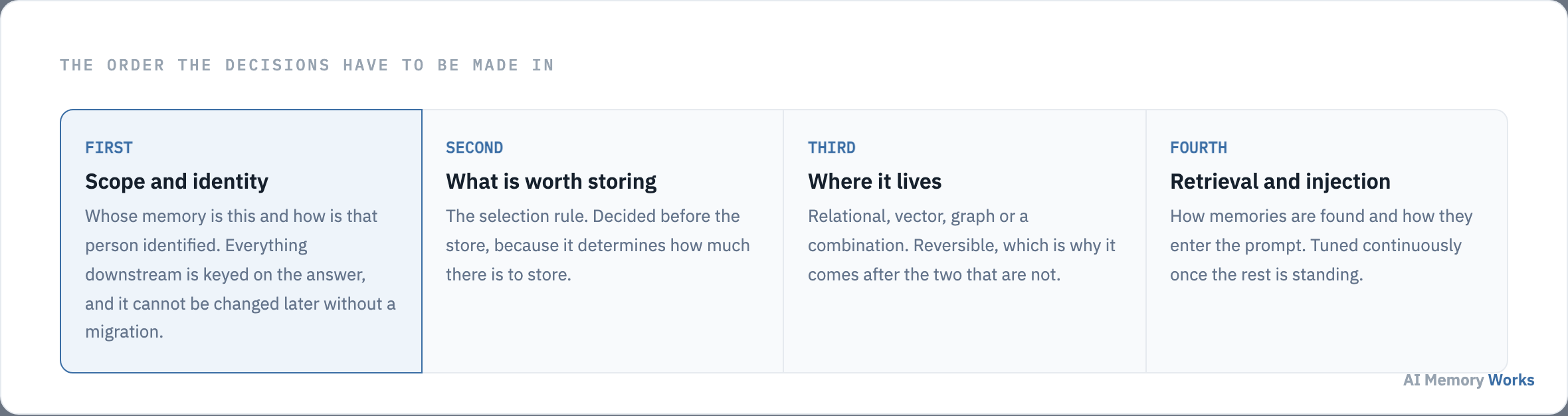
Scope comes first because rekeying a populated store means deciding retrospectively which user each existing memory belonged to, and that information is usually gone. Selection comes second because it determines volume, and volume determines whether the storage choice matters at all: a few thousand facts per user need no specialised infrastructure.
Storage is third and is genuinely reversible. Records written as discrete rows with their metadata can be re-embedded into a different index or loaded into a graph later, which is why choosing a backend is not the decision to agonise over first. Retrieval is fourth and never finishes, because scoring and injection are tuned continuously against real queries, as covered on how agents retrieve memories.
With the order settled, the practical question is where to start reading: which memory guide you need.
Routing
Which memory guide do you need?
Start from the symptom rather than the technology. Each guide below answers one question end to end, and the seven are ordered here roughly as a build would encounter them.
- Nothing built yet, and you want the whole loop working once: how do you add memory to an agent. This is the starting point for most readers.
- The agent works inside a conversation but greets returning users as strangers: how do you persist conversation memory across sessions.
- Memory persists but stops being useful as it grows: how do you build long-term memory that stays useful.
- You already have retrieval over documents and need to add per-user context: how do you combine RAG with memory.
- The agent knows facts but does not feel personal: how do you personalise an agent to one user.
- Memory works and the bill is rising: how do you reduce token cost with memory.
- Several agents need to share what one of them learned: how do you give several agents one memory.
If more than one describes your situation, take them in that order. Each assumes the previous problems are solved, and the second guide is a great deal easier once the first has been done properly.
Before starting any of them, it is worth knowing how little you have to build for the first version to be worth having: the smallest memory system worth building.
The floor
What is the smallest memory system worth building?
One table of claims keyed to a user, one background job that extracts them when a conversation ends, and one read that loads the top few at session start. No vector database, no graph, no consolidation pass, no scoring function.
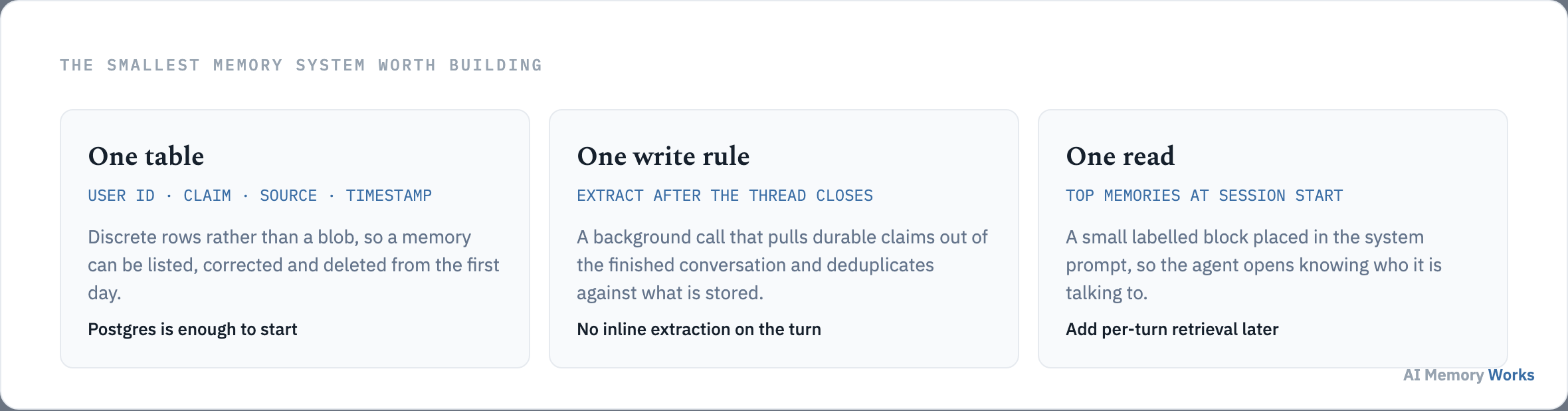
It works because the effect people respond to is not sophisticated retrieval, it is an agent that opens already knowing who it is talking to. A dozen durable facts loaded into the system prompt deliver that. The elaborate machinery matters later, when the store is large enough that choosing which memories to load is a real problem.
Two constraints make it worth building rather than a throwaway. Store discrete rows rather than one summary blob per user, so memories can be listed, corrected and deleted individually from the first day; a summary cannot be retrofitted into rows. And keep the write off the turn, so latency never becomes the reason memory gets removed later.
Grow it when a symptom demands it: add retrieval when the fact set outgrows the prompt, add embeddings when keyword search stops finding things, add consolidation when the store fills with near-duplicates. The full build is on adding memory to an agent.
Whatever you build, the next question arrives immediately and is harder than it looks: how to know the memory is working.
Validation
How do you know the memory is working?
Four checks in order: is anything written, is the right thing written, can it be retrieved, and does the answer change. Running them in sequence localises the fault, which matters because all four failures produce the same complaint.
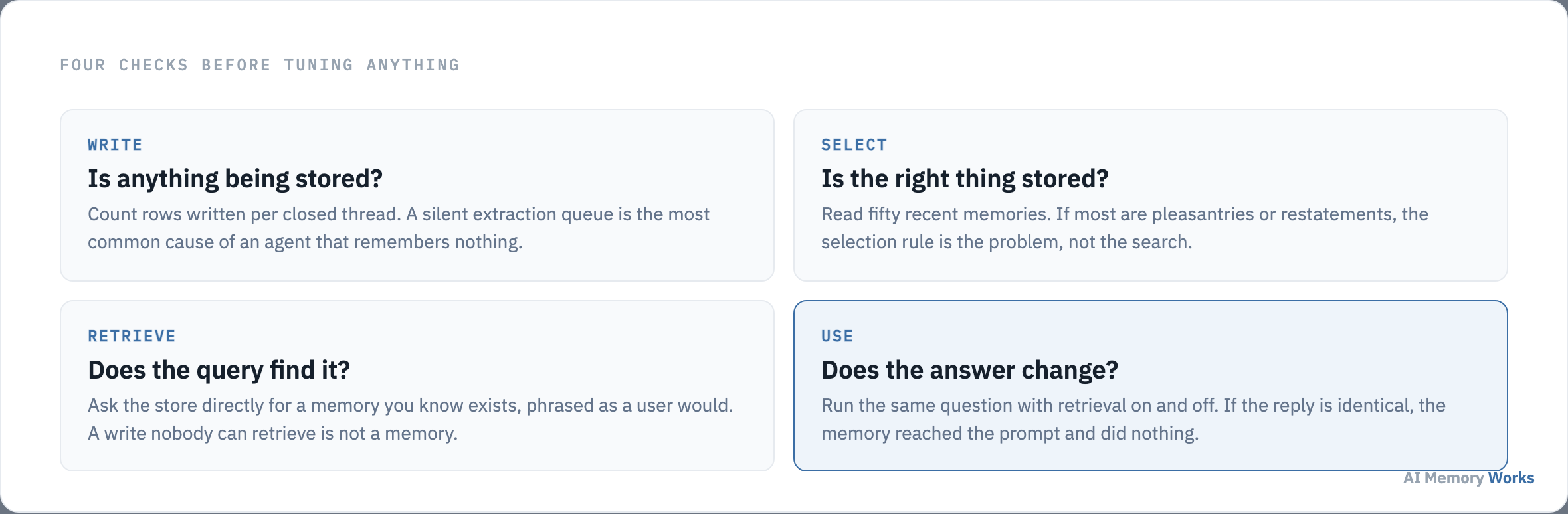
The first check catches the most common failure by a wide margin: a background extraction job failing silently. Nothing errors on the turn, the agent behaves normally in-session, and the absence only shows up days later as a vague report that memory is not working.
The second is a manual read of fifty recent memories. If most are pleasantries, restatements of the agent’s own replies or details that were true for an afternoon, the selection rule is wrong and no amount of retrieval tuning will help. The fourth check is the one teams skip: run the same question with retrieval on and off, and if the reply is identical, the memory reached the prompt and changed nothing.
Past these four, measurement becomes quantitative: retrieval precision, latency at the p99, and where they apply the two benchmarks that have become the standard tests for memory, LOCOMO for recall within a long conversation and LongMemEval for recall across sessions. All three are covered on memory evaluation metrics, with the benchmarks themselves on LOCOMO and LongMemEval.
Once it works, the constraint usually becomes economic rather than technical: what agent memory costs to run.
Economics
What does agent memory cost to run?
Less than not having it, in most cases, because the alternative is replaying an entire conversation history into every request. The costs that do exist are concentrated in one place, and it is not storage.
Storage is close to free: a year of durable facts for one user is kilobytes. Embeddings are cheap and paid once per memory. The real cost is the extraction model call, which reads a conversation and decides what to keep, and it is the one line item worth designing around.
Three things control it. Run extraction once per closed thread rather than per turn. Use a smaller model for it, since classifying which sentences are durable is an easier task than generating the reply. And apply the selection rule before extraction where you can, so obviously disposable turns never reach the model at all.
Against that, memory removes the largest recurring cost in a stateful agent, which is paying for the whole transcript on every turn. The arithmetic, including where the crossover sits, is on reducing token cost with memory.
Cost is rarely what sinks a first build. These four things are: what teams get wrong in a first memory build.
Pitfalls
What do teams get wrong in a first memory build?
Keying memory to the session, storing everything, extracting on the turn, and injecting memories without labelling them. All four are cheap to avoid at the start and expensive to correct once a store has been filled under them.
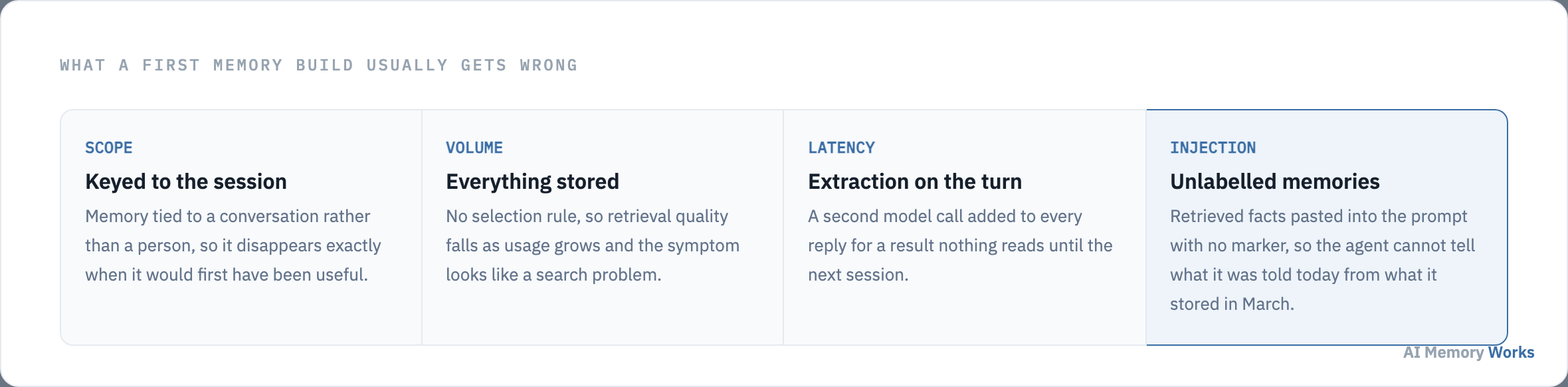
Session-keyed memory is the most common by a distance. It demos beautifully, because a demo is one conversation, and it fails exactly when a returning user would first have noticed the benefit. Storing everything defers selection to retrieval, where it cannot be done well, and produces a system that gets worse as it is used.
Inline extraction doubles the latency of every turn for a result nothing reads until the next session. Unlabelled injection is subtler: memories pasted into the prompt with no marker are indistinguishable from things the user said just now, so the agent will claim you told it something today that it stored in March, which reads as a hallucination and is a formatting bug.
A fifth is worth naming even though it is not technical. Teams add memory because it is expected rather than because a user problem demands it, and then measure nothing, so the feature can never be shown to be working or removed.
Which raises the question no vendor page in this field will answer: when you do not need agent memory at all.
The honest case
When do you not need agent memory at all?
When interactions are genuinely independent, when the user is anonymous, or when everything worth knowing already lives in a system you can query directly. Each of these describes a large number of real agents, and memory added to them is cost with no behaviour attached.
Independent interactions are the clearest case. A classifier, an extraction service, a one-shot summariser or a code formatter has no relationship to carry forward. Nothing said in one call bears on the next, and storing it produces a growing archive nobody reads.
Anonymous users make memory nearly impossible to key correctly, and the attempt is where the interesting failures live. Memory attached to an IP, a device or a shared phone number links people who are not the same person, which is worse than forgetting.
An existing system of record is the case most often missed. If the account tier, the order history and the entitlements live in a CRM or a database, the agent should query it rather than remember it. Copying authoritative data into a memory store creates a second version that drifts, and drift in a system of record is a bug with commercial consequences. Memory is for what the conversation produces and no system already holds.
A useful test before building: name one question a user will ask next month that the agent can only answer if it remembers this conversation. If no such question exists, retrieval over your documents is the whole requirement, and the distinction is set out on memory versus RAG. Where a real one exists, start with adding memory to an agent and follow the order above.
FAQ
Frequently asked questions
The questions that come before a first build: how long it takes, what to use, and whether a framework is required.
How long does it take to add memory to an agent?
The minimum system described above is about a day: one table, one background extraction job, one read at session start. What takes longer is the selection rule, which is tuned against real conversations rather than designed up front.
Do you need a framework to build agent memory?
No. A relational table and two functions cover the first version. A library earns its place once you want automatic conflict resolution, hybrid retrieval or a maintenance pass. See the best AI memory tools.
Do you need a vector database for agent memory?
Not at the start. Keyword search over a few thousand per-user facts works, and a vector index earns its place when retrieval starts missing memories that are phrased differently from the query. See vector databases for AI memory.
Should memory be built before or after RAG?
After, if you have documents to retrieve over, because RAG answers a different question and is usually the larger share of the value. The two are complementary rather than alternatives. See RAG with memory.
Can you add memory to an agent that is already in production?
Yes, and the ordering above still holds. The one thing to settle before shipping any of it is the scope key, because memories written under the wrong key cannot be reassigned later.
Which memory guide should a developer read first?
Adding memory to an agent if nothing is built, and persisting conversation memory if the agent already works within a session but forgets between them.