Guides · Implementation
How Do You Add Memory to an AI Agent?
Adding memory to an agent is five decisions: pick a store, pick the layer that manages it, decide when memories are written, decide how they are retrieved, and measure whether any of it helped. This guide walks each decision, shows one worked example across two sessions, and gives the framework shortcuts for LangGraph, CrewAI and n8n.
What you are building
Prerequisites
What do you need before adding memory?
Three things: an agent that already works without memory, a model with reliable tool calling, and a clear answer to what should survive the end of a session. The third is the one teams skip, and it is the one that decides whether the build is worth doing.
Memory is not free. It adds a write path, a search on every turn, a store to operate, and a new class of bug where the agent confidently repeats something that stopped being true. If nothing needs to outlive the session, the context window is already the right answer, as set out in memory versus the context window.
Write down the specific facts that must persist before choosing anything. “The user’s dietary preference” is a specification. “Context” is not, and it produces a store full of transcript.
With that list in hand, the build itself is a short sequence of decisions: the five decisions that make up an agent memory build.
The build
How do you add memory to an agent, step by step?
Five decisions, in this order: the store, the memory layer, the write trigger, the retrieval policy, and the evaluation. Everything else in an implementation is detail hanging off one of these.
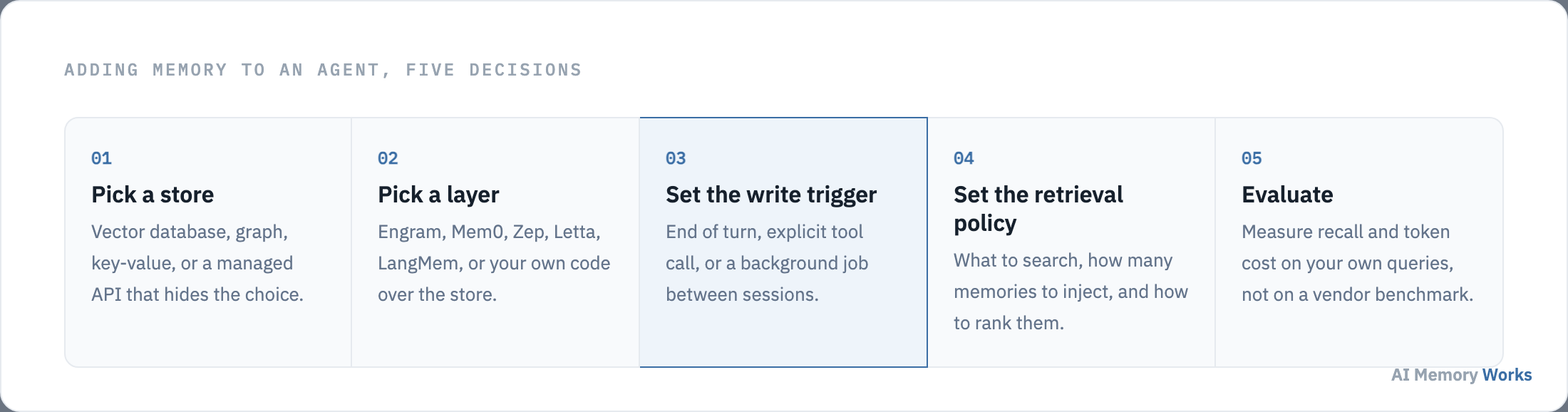
- Pick a store. A vector database for free-text facts, a graph where relationships and time matter, a key-value store for speed, or a managed service that hides the choice entirely.
- Pick a memory layer. Engram (Weaviate), Mem0, Zep, Letta or LangMem, or your own code. This is the component that decides what to keep and what to return.
- Set the write trigger. End of turn is the default. A tool call gives the agent control. A background job between sessions keeps the user-facing path fast.
- Set the retrieval policy. How many memories to inject, how to rank them, and whether to search on every turn or only when the query looks like it needs history.
- Evaluate. On your own queries, not on a vendor benchmark.
The first two decisions are usually made together, because a managed layer often assumes its own store: which memory architecture to choose.
Decisions 1 and 2
Which memory architecture should you choose?
Match the architecture to what your facts do: a memory API for facts that stay true, a temporal graph for facts that expire, paging for one conversation that never ends, and framework-native memory when you already run a framework.
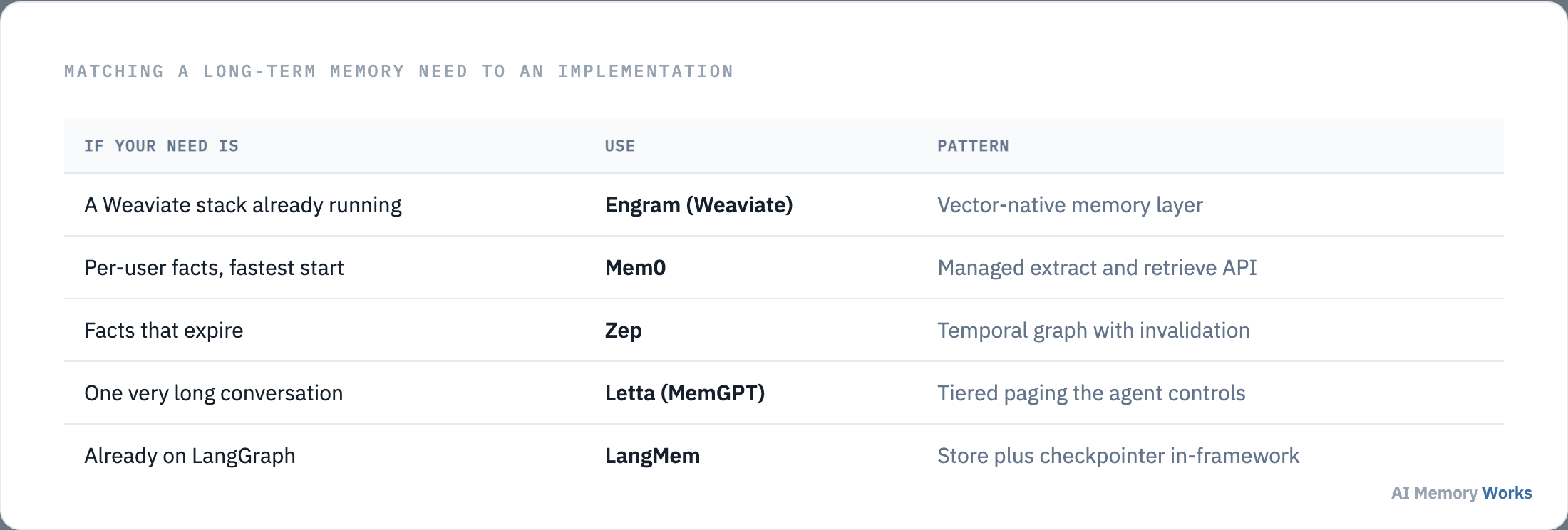
For a proof of concept, the fastest paths are Engram on Weaviate Cloud if you already run Weaviate, the Mem0 managed API if you do not, or LangMem if the agent is already a LangGraph graph. Each removes the store decision for you, which is the right trade while you are still learning what your agent needs to remember.
Build-your-own over Redis or pgvector is a legitimate choice, and it means implementing extraction, deduplication, ranking and eviction yourself. The full comparison is on the best AI memory tools.
Once the store exists, the first real code you write is the write path: deciding what the agent stores.
Decision 3
How do you decide what the agent writes?
Extract durable facts rather than storing turns, deduplicate against what is already there, and attach the user or tenant scope at write time. A memory store is only as good as the filter in front of it.
Three rules keep a store healthy from the first day.
- Store facts, not transcript. “User is vegetarian” is retrievable. A paragraph containing that sentence competes with every other paragraph.
- Deduplicate before writing. Check whether a similar memory exists, and update it instead of adding a near-copy. Skipping this is the single most common cause of a store that degrades.
- Scope every record. A user or tenant identifier on the memory, applied as a filter during the search rather than after it. Retrofitting scope later is painful and blocks deletion requests.
The mechanism in detail, including where extraction runs and what it costs, is on how agents write and store memories.
Facts in a store do nothing until something pulls them back out: how retrieval works at answer time.
Decision 4
How do you retrieve memories at answer time?
Embed the incoming query, search the store with the user scope applied, rank the candidates, and inject only the top few into the prompt. The number injected is a real design parameter, not a default to accept.
Ranking is where most of the quality lives. The canonical approach comes from the Generative Agents paper (Park et al., 2023), which scores each memory on recency, importance and relevance, with recency decaying exponentially at 0.995 per hour since last access. Most production systems implement some version of this, adding keyword matching so that exact terms are not lost to semantic similarity.
Two practical decisions follow. Search on every turn, or only when needed? Searching always is simpler and costs a lookup per turn; searching conditionally is cheaper and risks missing the turn that needed history. How many memories to inject? More context is not better, since every injected memory takes a slot and adds a chance of distraction.
The mechanism is covered on memory retrieval and the ranking detail on scoring and ranking memories.
Those two paths together are easier to see in one concrete case: a worked example of agent memory.
Example
Can you show an example of agent memory?
Here is the whole mechanism in two sessions three weeks apart, with nothing but a store and a search between them.
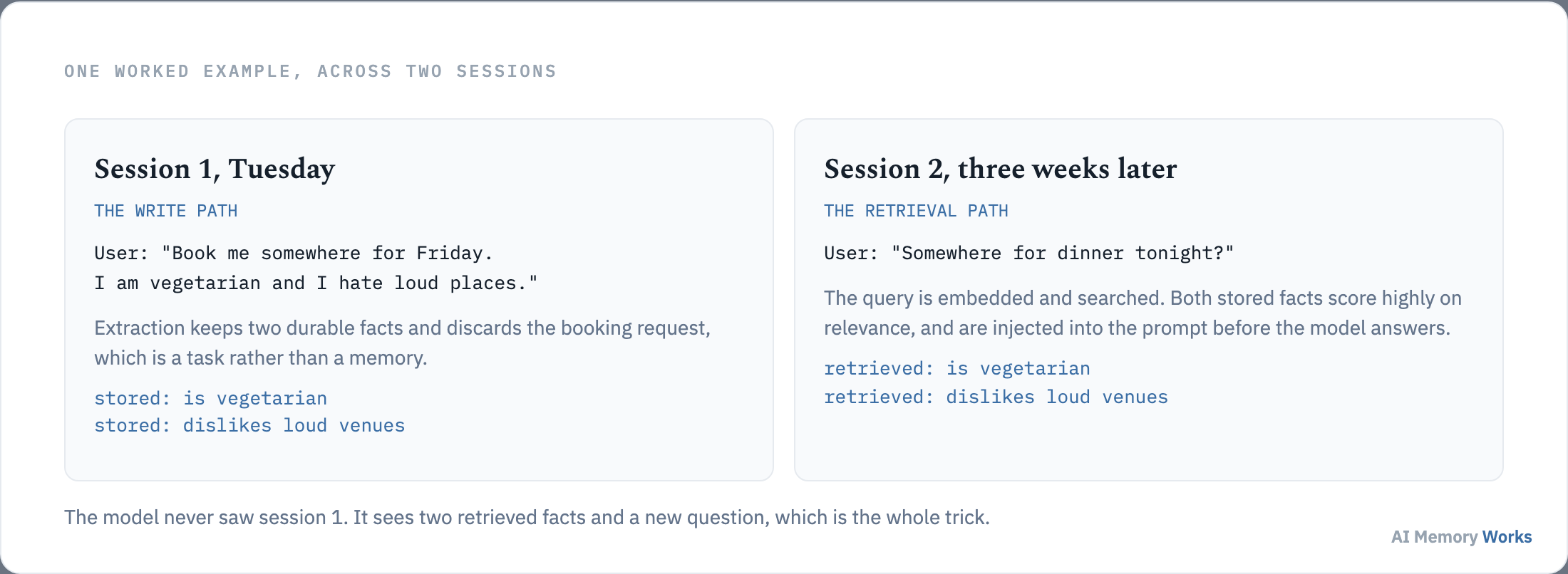
In the first session the user says they are vegetarian and dislike loud places, while asking for a booking. Extraction keeps the two preferences and discards the booking request, because a task is not a memory. Both facts are embedded, scoped to that user, and written.
Three weeks later the user asks about dinner, in a new session with an empty context window. The agent embeds the question, searches the store with the user scope applied, and both stored facts rank highly on relevance. They are injected into the prompt, and the model answers as if it remembered, having in fact been told a moment ago.
Two things in that example are worth noticing. The agent stored two short facts rather than the conversation, and the retrieval was driven by the new question rather than by the old one. Both are what separate a memory system from a chat log.
The example works. Whether it works on your traffic is a measurement: how to tell whether the memory is helping.
Decision 5
How do you know the memory is working?
Measure three things on your own queries: whether the right memory was retrieved, whether the answer used it, and what the whole thing cost in tokens and latency. A vendor benchmark tells you how a tool performed on somebody else’s data.
- Retrieval hit rate. Build a small set of questions whose answers depend on a stored fact, and check whether that fact is in the retrieved set. This is the measurement that catches phrasing mismatches.
- Answer correctness. Retrieval succeeding and the answer being right are different events. A memory can be retrieved and ignored.
- Cost and latency. Tokens per query and the added round trip. The argument for memory over a long prompt is usually economic: Mem0 reports roughly 1,800 tokens per query against 26,000 for a full-context baseline, with p95 latency of 1.44 seconds against 17.1 seconds (Chhikara et al., 2025).
The public benchmarks are useful as a sanity check on the tool rather than on your system. They are covered on LOCOMO, LongMemEval and memory metrics.
If you are working inside an agent framework, much of the wiring above is already written: the framework shortcuts.
Shortcuts
What are the framework shortcuts?
LangGraph, CrewAI and n8n all provide a memory hook, and none of them changes the loop underneath. The shortcut is that the write trigger and the retrieval call are already positioned for you.
- LangGraph. A checkpointer holds conversation state and a store holds longer-lived memories, which is what LangMem packages. See LangMem.
- CrewAI and n8n. Both expose the same add and search pattern against a memory backend, so the orchestrator changes but the memory design does not.
- Letta. The agent manages its own tiers, so the write trigger becomes a tool the agent calls rather than code you position. See virtual context.
Whichever route you take, the same handful of mistakes shows up in first builds: what goes wrong the first time.
Failure modes
What goes wrong in a first memory build?
Five mistakes account for most disappointing first implementations, and all five are decisions that were skipped rather than bugs that were introduced.
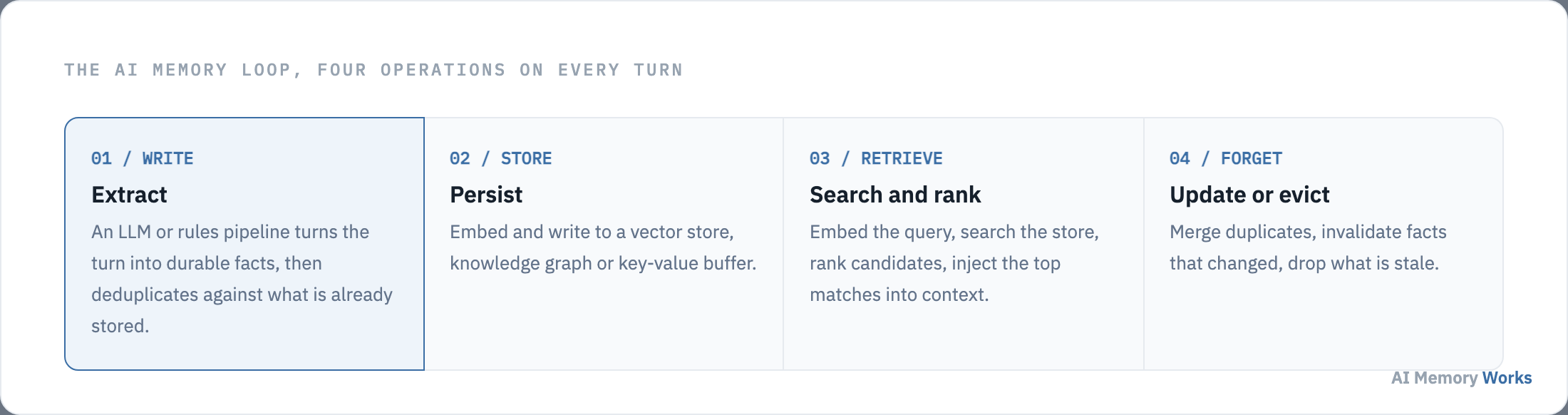
- Storing turns instead of facts. Writing whole messages is the fastest thing to build and produces a store that retrieves badly, because every candidate looks equally relevant to a semantic search.
- No deduplication. Without a check on write, the same preference accumulates in several wordings, and the agent starts contradicting itself about something it was told once.
- No scope. Memories without a user identifier cannot be filtered safely and cannot be deleted on request. Retrofitting scope means rewriting every record.
- Injecting too much. More retrieved memories is not better. Every injected memory occupies a slot and adds a chance of pulling the answer off course.
- Never forgetting. A store with no eviction policy grows without limit, and retrieval quality falls slowly enough that nobody attributes it to the memory system.
The pattern is that a memory system is usually at its best on launch day and quietly worse each month afterwards. Building consolidation and eviction in from the start costs little; adding them to a store that already holds a year of unfiltered writes costs a migration. Both are covered in memory consolidation and forgetting and eviction.
The longer-lived version of this build, where memory has to survive months rather than sessions, is covered in how to build long-term memory for an LLM agent, and persistence specifically in how to persist conversation memory.
FAQ
Frequently asked questions
The questions that come up during a first build: what to store, how much it costs, and what to do when memories conflict.
What is the easiest way to add memory to an AI agent?
Mem0 Cloud API — sign up, call add() after each turn and search() before each LLM call. No vector infra to manage. See step-by-step above and Mem0 alternatives.
How do I add memory with Mem0?
Install the SDK, set your API key, call memory.add(messages, user_id) after each turn and memory.search(query, user_id) before the LLM call. See Mem0 alternatives for setup details.
How do I add memory to a LangGraph agent?
Use LangMem for native checkpointer + store integration, or Engram/Mem0/Zep as external APIs at graph node boundaries. See LangMem.
How do I add memory to an n8n AI agent?
Add HTTP Request nodes calling Engram, Mem0 or Zep APIs — write after the agent responds, retrieve before the next LLM node. Same five-step pattern as any framework.
How do I add memory to CrewAI?
Wire Engram, Mem0 or Zep SDK calls in task callbacks — extract facts after each agent turn, inject retrieved memories into the next task prompt. See writing memories.
How do I add memory to OpenAI Agents SDK?
Use Mem0 or a vector store as external tools, or implement write/retrieve in your agent loop before each responses.create() call. See memory as a tool.
Can I add memory without a framework?
Yes — DIY with Redis or pgvector: embed facts after each turn, search before each LLM call. You implement extraction, ranking and eviction yourself. See storage backends.
How much does agent memory cost?
Costs: embedding API calls, vector storage, and retrieval latency. Managed APIs (Mem0) bundle these; DIY you pay per embedding + DB hosting. Reduce tokens by selective retrieval vs resending full history.
Is agent memory secure?
Scope memories per user_id, encrypt at rest, add TTLs for sensitive data and audit retrieval logs. Never store secrets in plaintext memory.
When is agent memory production-ready?
When recall passes LOCOMO/LongMemEval on your domain, latency is under SLA, and you have eviction + conflict handling. See evaluation hub and step 5 above.